Key takeaways
-
Visualize complex ideas with storyboarding. UX designers and product managers use this visual tool to map customer journeys in a clear and organized way.
-
Align your teams and get stakeholder buy-in. By visually mapping your customer journey in a storyboard, you eliminate ambiguity and ensure that everyone is on the same page, accelerating approvals.
-
Identify areas of improvement early on. By bringing your product to life, you can quickly identify errors and make adjustments as needed. Fixing issues proactively saves time and prevents rework later in the project.
Some of the best pieces of literature and television have complex plots that boggle the mind. Consider the Game of Thrones television series, which spanned eight seasons and contained at least 52 significant characters. Or The Lord of the Rings, a plot so rich that its author, J.R.R. Tolkien actually created an entire book just of his characters’ genealogies. When wrangling complicated works, it’s nearly impossible to keep track of everything in your head.
And here’s a secret: No writer or director keeps intricate plots in their head. It’s all written down. Creativity thrives in organization, even if that sounds counterintuitive. So if you’re a UX designer or product manager who wants to understand your customers better and design great experiences, then it's time to get your ideas out of your head and onto the canvas.
The most common method used is storyboarding.
In this article, we’ll walk you through the main elements of a storyboard and why this technique, which is primarily used in film, television, and writing, is a tremendous asset for creating incredible products.
What is a storyboard?
A storyboard is a shot-by-shot breakdown of every plot point. The end result resembles a comic book, minus the dialogue. It’s a visual representation of a journey. It often contains notes about each step of the journey to accompany each picture of the storyboard.
Storyboard vs. customer journey
Though similar, storyboards are different from a customer journey map. Storyboards are highly specific, whereas customer journey maps are broad, encompassing the entire end-to-end customer experience. They are often more structured, designed to identify pain points and opportunities for improvement. A storyboard is mainly focused on testing a new idea or concept during the ideation phase. Customer journey maps are most effective at the beginning of a project to align stakeholders before the work is started.
Storyboard vs. wireframe
Storyboards and wireframes are a complementary pair. The visual aspects of a storyboard capture the user’s emotion and context, while the static, informative nature of a wireframe provides the logistics. Both play an important role in UX to ensure you are effectively delivering on your users' needs.
Why storyboards are useful
Storyboarding brings the user journey to life. Here’s why that matters:
Show and tell
Explaining ideas in visuals is a highly effective way to convey your ideas. For UX designers, it’s much easier to show a user will interact with your product than to just describe it. Storyboarding is a clear and efficient way to present information, making it easier to absorb.
Share your vision
When large teams work on the same project or product, it's challenging for everyone to align on the vision. But when you show them that vision in a storyboard, there's less room for misunderstanding and individual interpretation. When everyone is clear on the product vision from the start, they can work more effectively and accelerate productivity.
Get buy-in from stakeholders
Clearly communicating your ideas to stakeholders is imperative. You can explain the new online check-out process ad nauseam, or you can show them the process with visuals. When stakeholders can clearly see your ideas in action, they’re much more comfortable giving their approval and lending their resources to help.
Pinpoint errors ahead of time
Storyboarding empowers you to quickly pinpoint any flaws in your design. You can fix them on paper long before you need to fix them in the product, saving time and money.
How to create a storyboard
Step 1. Analyze your data
You’ve likely already done a fair amount of research for your product like focus groups, customer interviews, and surveys. This is the data you’ll lean on when you start storyboarding instead of relying on conjecture.
Step 2. Choose a focus
Different types of users will interact with your product in different ways. For your storyboard, only focus on one use case and one user journey at a time. There are no limits to how many storyboards you can create.
Step 3. Explain your user
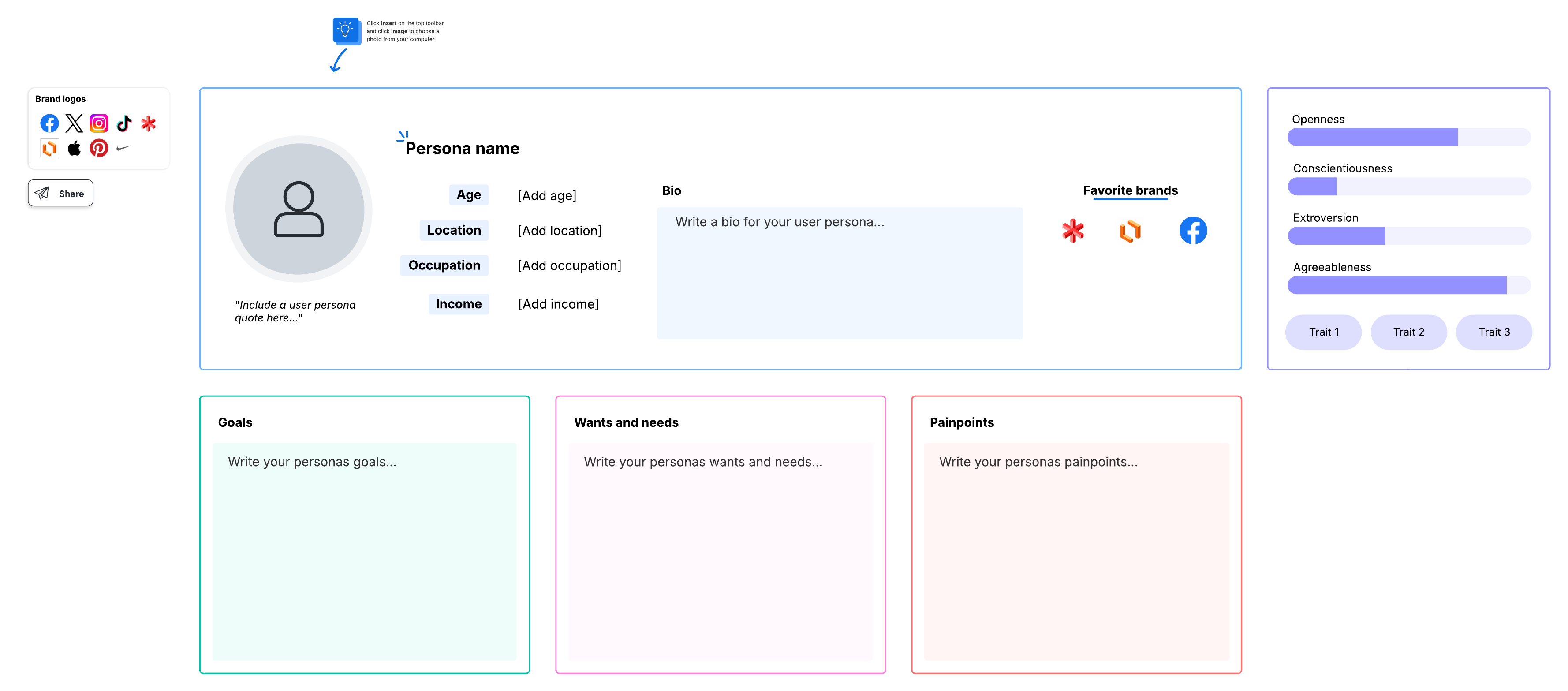
Who’s using your product? What kind of solution is the customer looking for? By creating user personas who seem like real people, it’s easier to create a believable storyboard that addresses real problems.
Step 4. List important touchpoints
Some people prefer to list every point of interaction, but if you start with the important touchpoints first, they’ll help guide the rest of your user journey. It’s smart to start off with a list instead of jumping straight into the storyboard. Otherwise, you may need to rearrange boxes in the future.
Step 5. Show the product context
Say you’re developing a translation app. In your product storyboard, you may show a recent college graduate taking a trip to Morocco. You might show the recent graduate packing, arriving in Morocco, and then attempting to purchase something at a bazaar. Next, you’ll show how the graduate uses the app to translate. Storyboards tell the entire story, allowing you to see how the product will function.

Create storyboards with Lucid
Historically, storyboards have been conducted with pencil and paper.
Fortunately, Lucid provides a more efficient way to create UX storyboards that you can collaborate on with team members and stakeholders in real time. Here’s how:
Makes it easy to get started
Lucid's infinite canvas is equipped with powerful capabilities to guide you through the storyboarding process. Confidently facilitate, opens in a new tab brainstorming meetings, categorize and sort your thoughts, and use Lucid AI , opens in a new tabto expand on your ideas.
Facilitates freeform creativity
Often, designers spend a lot of time getting software to work correctly instead of fostering ideation. With Lucid, documenting your storyboard is intuitive and seamless, with features like online sticky notes and freehand drawing.
Provides a truly collaborative workspace
Getting teams on the same page can be a hassle, especially for remote and distributed workers. While you’re storyboarding in Lucid, the whole team can contribute ideas in real time. Plus, everyone can communicate directly within the solution through comments, @mentions, and chat. It’s easy and fun to collaborate on a storyboard, and it encourages a sense of ownership. This kind of real-time storyboard creation helps ensure everyone understands the larger vision.
You may even wish to present a first draft of your storyboard to the team and challenge them to identify creative enhancements to the user experience. Think about the translation app mentioned previously. Maybe the app could also be used as a currency converter or have other capabilities. Storyboards bring the product to life and inspire innovation on your team.
Takes your project from ideation to delivery
Once you have your storyboard ready, you can create a user story map, opens in a new tab and other assets to start taking action and building out the UX. In fact, you can even use the storyboard to help determine the most important features of a product and its dependencies. Even though storyboarding may seem like an additional step, it’s well worth the extra time spent to make your product and the user journey come to life.

Now that you know how to storyboard, create your own with our free storyboard template.
Try it now