
Key takeaways
-
Scrum is an Agile framework that helps teams deliver high-quality products while working iteratively in sprints.
-
Kanban is a method that helps teams visualize their workflow and reduce work in progress.
-
Key differences between Scrum and Kanban include timeframes, roles and responsibilities, prioritization, and philosophies toward change.
Today, many businesses are practicing agility in order to remain competitive. Agile methodologies help companies deliver products that align with customers’ ever-changing needs, but what that looks like in practice varies widely among teams and companies. With so many Agile frameworks to choose from, it can be difficult to determine which approach best supports your business goals.
In this article, we’ll be taking a deeper look at two common Agile frameworks: Scrum and Kanban. Though both frameworks share similar principles, the delivery timelines, prioritizations, and roles and responsibilities vary between them. We’ll help you understand the differences between Scrum vs Kanban so you can decide which framework is best for your team.
What is Scrum?
Scrum is a lightweight Agile framework that helps teams address complex problems while efficiently delivering high-quality products that delight customers.
The Scrum framework focuses on empirical process control that’s based on three core pillars:
-
Transparency. People need visibility into the development process at every stage in order to make effective decisions that drive initiatives forward. Teams can ensure everyone works together toward a common goal by using a shared empirical language and holding regular Scrum meetings.
-
Inspection. To keep work on track, teams regularly inspect what is being created and how (without interrupting the flow of work).
-
Adaptation. It’s impossible to predict every requirement or scenario, so when plans deviate, teams should adapt their processes or product as soon as possible. Scrum provides opportunities to adapt at the end of every iteration to prevent wasted efforts and streamline productivity.
Scrum roles and responsibilities
There are three primary Scrum roles and responsibilities:
-
Product owner: The product owner is the sole person responsible for managing the product backlog and maximizing the value of the final product.
-
Scrum master: The Scrum master is responsible for implementing Scrum and ensuring the team understands Scrum theory and practices. The person in this role acts as a coach and advisor to the team while facilitating communication and collaboration.
-
Development team: The developers make up the rest of the team. They are responsible for executing the work to create a usable increment at the end of each sprint. Developers work together to plan the sprint, ensure quality, adapt as needed, and hold each other accountable.
What is Kanban?
Kanban is a methodology designed to work with the systems and processes you already have to help manage (and reduce) work in progress, increase efficiency, and streamline productivity without getting overworked. Kanban is less time-bound than Scrum, focusing instead on visualizing work to maximize flow and shorten the time it takes to finish initiatives. The methodology also focuses on balancing workloads in order to reduce bottlenecks.
Kanban is driven by a few core principles:
-
Start with what you currently do. Kanban is a flexible framework that can be blended with the processes and methodologies you’re already using in a non-disruptive way. The framework recognizes the value of current processes while highlighting opportunities to improve over time.
-
Pursue incremental, evolutionary change. Kanban is designed to meet minimal resistance. Sweeping changes are discouraged because they are disruptive and can cause fear and uncertainty.
-
Encourage acts of leadership at all levels. Insights and feedback from all employees are valued to drive collaboration and continuous improvement.
Kanban roles and responsibilities
Kanban has no required roles, but there are two roles that you may consider formalizing in your implementation of the framework:
-
Service Delivery Manager (SDM): This person ensures that work items flow efficiently while facilitating continuous improvement.
-
Service Request Manager (SRM): This person orders and prioritizes work items and improves corporate governance within processes.
Scrum practices
There are five basic types of Scrum meetings and events:
1. Sprint planning
The first step of Scrum is laying out the work that will be done during a sprint. The entire team collaborates to plan the sprint with the product owner acting as the point person to ensure all participants are prepared for the discussion.
2. Sprint
The sprint itself is when the work mapped out during the planning phase is performed. Sprints are short increments of work lasting one to four weeks. Once a sprint ends, the next sprint begins. Sprints create consistency in development phases and ensure that teams can predictably meet product goals while allowing for adaptation as needed.
3. Daily Scrum
The daily Scrum (also known as daily standup) is a 15-minute meeting for the team to inspect progress toward the sprint goal and adapt the sprint backlog as necessary. By holding a daily Scrum, teams can more effectively organize, plan, and execute work that is aligned with product goals while improving team communication and problem-solving.
4. Sprint review
At the end of the sprint, the team holds a sprint review to inspect the outcome of the sprint and determine next steps. This is an opportunity for the Scrum team and stakeholders to review what has been accomplished, outline any changes, and adjust the product backlog to address new opportunities.
5. Sprint retrospective
The sprint retrospective concludes the sprint. The purpose is to identify opportunities to improve quality and effectiveness by evaluating how the sprint went. This includes assessing individuals, processes, tools, interactions, assumptions, and the team’s definition of done. The team considers what went well, what could be improved, and what they will do differently in the next sprint.
Kanban practices
Kanban follows six key practices:
1. Visualize the flow of work
Kanban uses physical cards or virtual software to create Kanban boards, which visualize work in progress, work that’s been completed, and work yet to be started. The board represents your workflow’s current state, including its risks and specifications.
2. Limit work in progress (WIP)
Kanban encourages your team to focus first on the tasks at hand before adding new work. This practice ensures that the team only works on tasks for which they have the capacity.
3. Manage flow
One of the main goals of Kanban is to streamline workflows. Prioritize managing work, not people, by focusing on the flow of tasks and understanding the processes to ensure work is moving smoothly.
4. Make process policies explicit
Processes should be clearly defined, published, and shared to increase understanding and buy-in across your team or organization. Visually diagram these policies and guidelines for managing the flow of work to improve self-organization and drive alignment.
5. Implement feedback loops
Feedback is crucial for identifying issues and opportunities for continual improvement. Implement regular reviews with both your team and customers to gather valuable feedback and incorporate insights into your workflow.
6. Improve continually
Collaboratively implement changes based on evidence and regularly review your systems and processes to ensure continuous improvement.
What is a Scrum board?
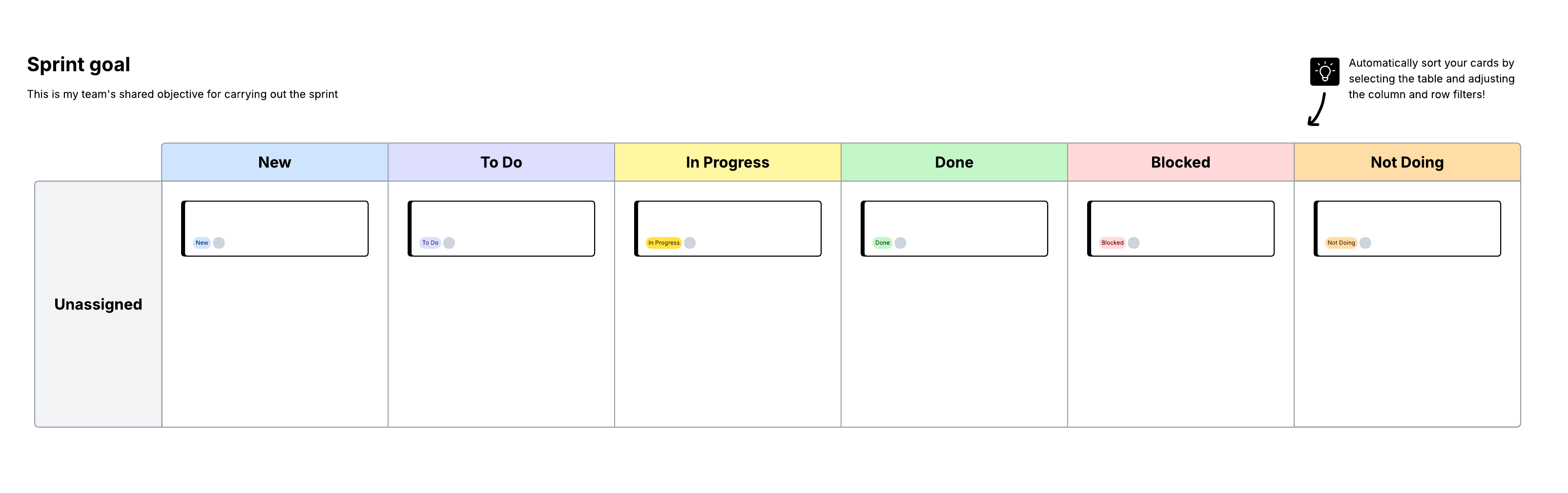
A Scrum board is a visualization tool used to track work in short, incremental sprints. Typically, the board is divided into horizontal lanes or vertical columns that the team can use to track the progress of agreed-upon work to be completed in the sprint.
Scrum boards can be virtual or physical. Either way, they often include these columns:
-
To do: The prioritized backlog of work items planned for the current sprint
-
In progress: The list of tasks that have been started
-
In test: Completed tasks that are being tested for verification
-
Done: Tasks that have been completed and verified by testing
Before a sprint ends, the goal is to move all tasks to the “Done” column.
There is no set format for creating a Scrum board, as it is often left up to teams to decide how to present the necessary information. You can add or remove lanes and columns to suit your needs.
Why use a Scrum board?
A couple of important principles of Scrum are teamwork and transparency. All members of the team need to be aware of the work being done, the team members completing the work, progress, and team accomplishments.
A Scrum board facilitates these principles in the following ways:
-
Promotes team interaction and discussion: Team members and stakeholders look at the board to discuss progress and prioritize work.
-
Makes information visual and easily accessible: Whether your board is physical or virtual, the information it displays is easy to digest and easy to access. Anybody looking at the board can quickly assess where the team is in the iteration and what still needs to be done to achieve goals.
-
Supports full team commitment: When the team views all the work on the board, it keeps people from focusing only on individual tasks. Those with extra capacity can see where they can step up and take on additional tasks.
Scrum boards are designed to help teams complete specific user stories and tasks within a specific time frame. You’ll want to use a Scrum board if your team works based on iterations or sprints.
What is a Kanban board?
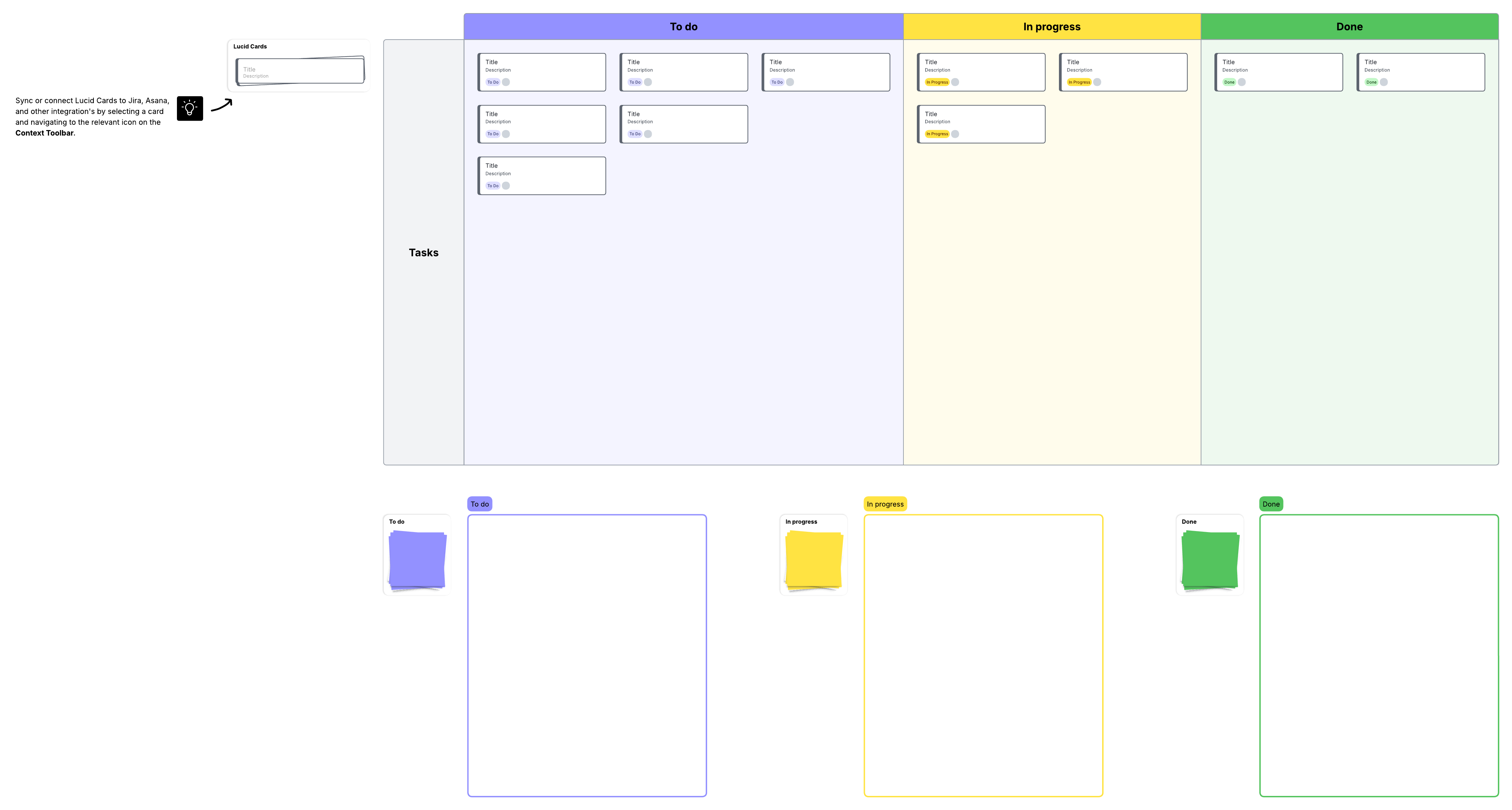
A Kanban board is a visualization tool that includes columns to visualize and track work, aiming for just-in-time continuous improvement to help development teams commit to the right amount of work.
A Kanban board aims to limit the number of in-progress tasks. The number of tasks that are in progress should be large enough to keep all team members engaged but small enough to avoid busywork, ultimately supporting a sustainable workflow.
The workflow in a Kanban board typically includes these three categories:
-
Queue: Work that needs to be done
-
In progress: Work that has been pulled from the queue and is currently being worked on
-
Done: Work that has been completed
Each category will have a limit on the number of work items that are assigned to it. For example, if the team determines that no more than six work items can be in the “In progress” column at any time, new work cannot be pulled from the queue until current work is completed.
As the queue is depleted, new tasks can be added to it. This process keeps work flowing smoothly, ensures nothing is overlooked, and keeps all team members engaged.
Why use a Kanban board?
The main reasons to use a Kanban board are to visualize workflow, limit the amount of work in progress, and reduce waste. Teams can get a clear view of all of their tasks at a glance, making it easier to track their progress and identify bottlenecks. If your team particularly wants to focus on completing work in progress rather than multitasking to increase efficiency, a Kanban board is for you.
Whether you choose to use a physical or an online Kanban board, you can easily customize your board to include any categories or columns that you want. This flexibility makes Kanban a popular choice for teams outside of software development, such as marketing, project management, HR, and operations teams.
Differences between Scrum and Kanban boards
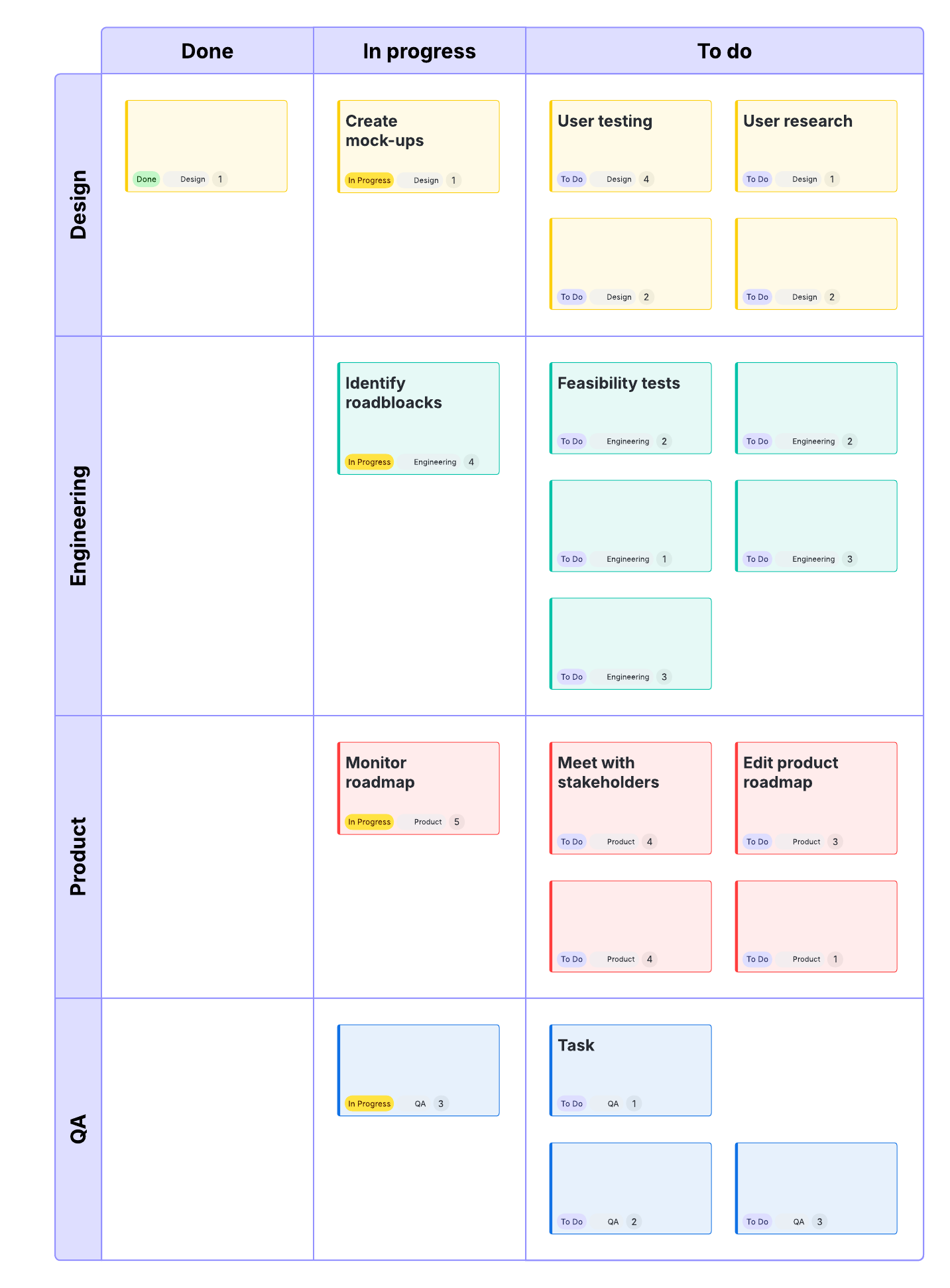
When comparing a Scrum board vs Kanban board, the differences may not be immediately obvious. Both boards are used to visually track work that needs to be done, is in progress, and has been completed. These Agile boards help keep the team engaged and focused on the goal.
However, Scrum boards follow a very specific, rigid methodology, while Kanban boards are much more fluid and can be more easily adapted. Here are a few of the major differences between the two boards.
Timing
Scrum: In Scrum methodology, teams prioritize work and commit to a set number of tasks within a sprint, which is typically two to four weeks. Work is released at the end of each sprint.
Kanban: Kanban is not limited to an iteration or a sprint but instead supports continuous delivery. Teams continue working on tasks as more work comes in.
Roles
Scrum: Scrum roles include the product owner, Scrum master, and development team.
Kanban: Agile Kanban boards have no set roles.
Work in progress
Scrum: Tasks cannot be added to a Scrum board in the middle of a sprint, but it is possible for all tasks to be in the “In progress” column at the same time.
Kanban: The team agrees on the amount of work that needs to be done and the number of tasks that can be in progress at the same time. As tasks are completed, team members pull new tasks from a queue.
Philosophy toward change
Scrum: Work is not added during a sprint. Although the whole team has access to the Scrum board, only the product owner can make changes to the board during a sprint.
Kanban: Kanban boards are flexible and can be changed at any point.
Reports
Scrum: Scrum teams can review performance with velocity as their primary metric, using sprint burndown charts and a number of other reports.
Kanban: There is not a specific reporting method prescribed for Kanban, but teams often use a cumulative flow diagram.
Retrospective
Scrum: At the end of a sprint, teams hold sprint retrospective meetings to discuss what went well and how they can improve.
Kanban: Because Kanban boards do not have a set ending period, there is no retrospective meeting associated with this framework.
Visualize your Scrum or Kanban processes with Lucid
Ultimately, both Scrum and Kanban are valuable approaches within the Agile mindset. Whichever one you choose will depend on the needs, goals, and dynamics of your team—and keep in mind that mixing aspects of both approaches is possible. Many teams implement a combination that’s known as “Scrumban,” holding Scrum events while using Kanban boards to track their progress.
Whatever Agile approach you take, use Lucid to visualize your processes and facilitate your team meetings. Lucid offers a variety of Kanban and Scrum templates to help you build out boards quickly, and you can host this documentation in a central place that’s easy for everyone to access. By bringing your Agile approach to life with a visual collaboration solution, you can boost efficiency and ensure that everyone’s on the same page.

Get Scrum and Kanban templates for your team
Check out Lucid’s team check-in templates and keep your team aligned while maintaining visibility on tasks and progress.
Go now