Key takeaways
- An empathy map uses four quadrants to capture what users say and do, think and feel, see, and hear.
- Build maps from real research to keep design focused on user needs.
- Collaborate with stakeholders to build consensus around user insights and turn them into clear, prioritized tasks.
- Frictionless user experience (UX) design can raise conversion rates up to 400%.
As a UX designer or a CX researcher, one of your superpowers is your empathy for your users. That empathy isn't just based on hunches—it's grounded in qualitative feedback and research. But you may find yourself wading through too much data and struggling with how to present it to the rest of your team. Beyond that, you might be wondering how to turn all that information into actionable plans.
That's where empathy maps come in. They're straightforward visual tools for cross-functional teams—product, marketing, sales, and leadership—to build a shared understanding of customers so decisions stay grounded in what people actually experience. In this article, we'll walk you through how to create a useful empathy map to meaningfully capitalize on that hard-won user empathy.
What is an empathy map?
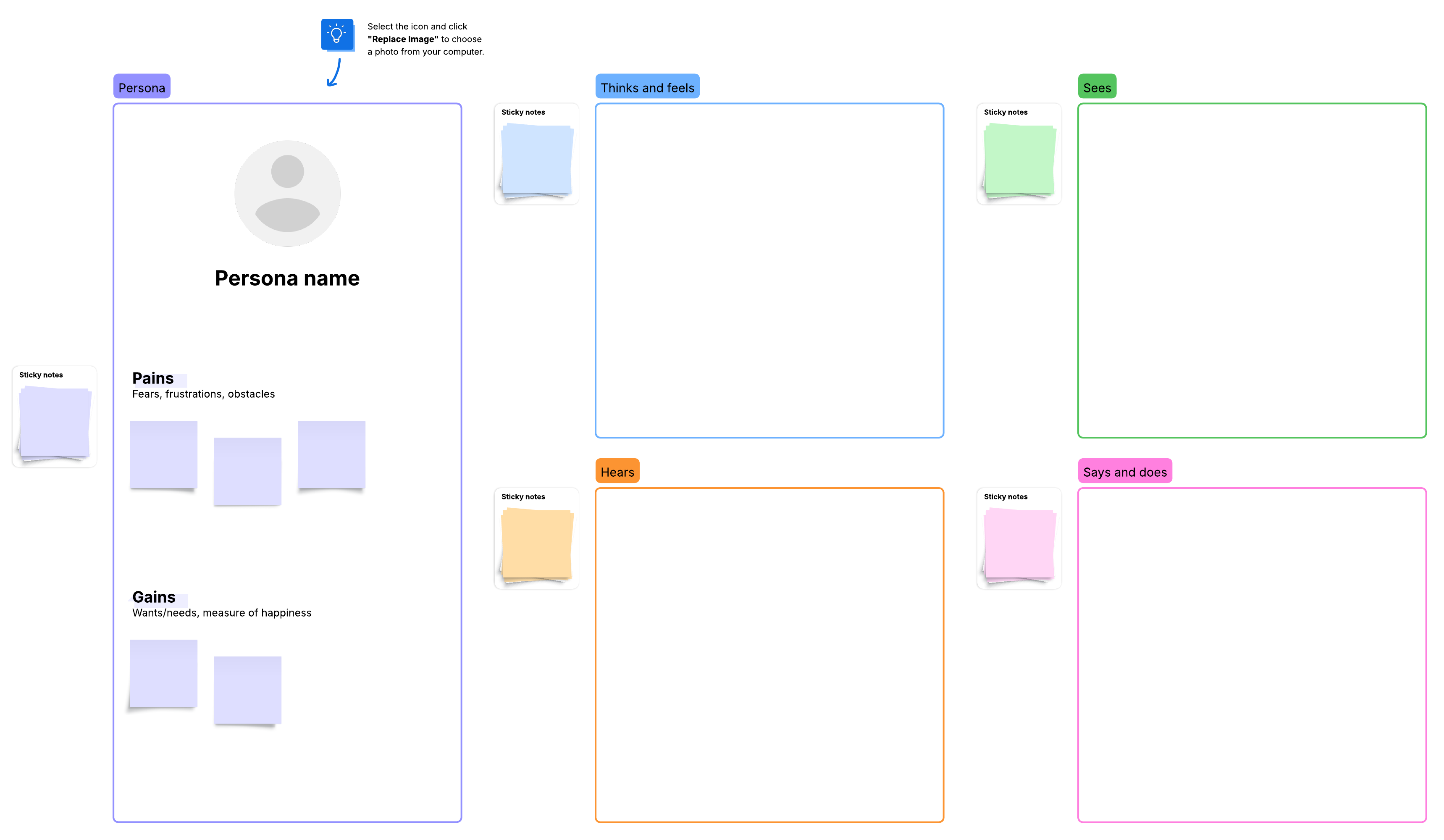
An empathy map has four quadrants that outline what you know about your users' attitudes and behaviors. Empathy maps help you visualize your users to understand their needs and desires. This is a powerful way to improve product design quality. And, if your team follows the design thinking methodology, opens in a new tab, these maps can be a great addition to the empathize stage.
Here are the main benefits of empathy mapping:
- Develop a user journey: Understanding your users helps you anticipate how they'll interact with your product.
- Keep your design pragmatic: You may have some ingenious design plans, but your users may not want them. Empathy mapping keeps features aligned with your users' desires.
- Map user needs: Empathy maps help you locate the deep, unmet needs of your users.
Think of it this way: if you're buying a Secret Santa present for someone online, and the only thing you know about your gift recipient is that she likes dogs, you're limited in what you can buy.
On the other hand, if you're given details about the person and know she owns a Great Dane named Casserole, lives in Wisconsin, and enjoys hiking, you can buy a personalized, useful present for her. Similarly, your empathy map will help you gain clarity around decisions you make in your design.
The better you understand your users, the greater value you'll be able to deliver. Empathy mapping is a powerful way to advocate for your users and build products that resonate. According to renowned scholar Brené Brown, empathy "fuels connection." It's the ability to understand another perspective so well that you are "feeling with people" rather than simply feeling for them. That connection turns scattered feedback into meaningful solutions.
For Agile teams, empathy maps are often used as a collaborative alternative to heavy documentation. Often known as a “10-minute persona,” empathy maps are completed as a brief team exercise rather than an exhaustive research endeavor.
Empathy map format
The four quadrants of an empathy map contain the following:
Says and does
Include direct quotes you've obtained from your users throughout your research. Here are some examples:
- I really hate having to accept cookies. I don't even know what cookies are.
- What do I do after I log in?
- This drop-down menu is weird.
A user's actions also reveal important insights. Your user may say one thing and do another.
You may notice actions such as:
- Instinctively swipes up
- Tries to use Apple Pay during checkout
- Abandons cart
If you're running a team workshop (not just synthesizing interviews), you can also include paraphrased quotes and observed behaviors from stakeholders who interact with customers (e.g., support, sales, success) as long as you can trace them back to real customer evidence.
Thinks and feels
This quadrant requires some conjecture, since you can't actually read your users' thoughts, and they may not articulate what they're feeling. But you can make educated guesses about how the user feels during the journey, including mood, motivations, reactions, needs, and frustrations.
Here are some examples of the thoughts your users may have:
- Ugh, I don't want to get up and find my credit card.
- I'm not giving them my email address.
- Why can't I just share this with my friend with one tap?
And here are some examples of feelings:
- Frustrated when the page doesn't load quickly enough
- Worried they didn't receive a confirmation message after submitting info
- Annoyed they're having to repeat a step
Sees
What does the user see when interacting with your product, both online and in their physical environment? For example:
- Ads from competitors
- Working from their desk
- Aesthetic elements of the product
You can also capture attention cues—like where their eyes go first, what they notice, and what they overlook—because those details often explain confusion or drop-off.
Hears
What information and feedback does the user hear from others, including friends and influencers?
For example:
- What are their peers and co-workers saying?
- What is their boss telling them?
- Word-of-mouth product recommendations
Once you've filled the quadrants, treat the map as a living source of truth, opens in a new tab that the team can return to when tradeoffs come up.
8 tips for creating empathy maps
When done right, empathy maps can help you deliver standout user experiences that boost your bottom line. In fact, Forrester research, opens in a new tab found that frictionless UX design could raise customer conversion rates up to 400%.
There's also strong evidence that customer-centricity pays off in speed and financial performance. Pragmatic Marketing found that companies focused on user needs were twice as fast at getting new products to market. And McKinsey research, opens in a new tab reveals that improving the customer experience increased sales revenues by 2% to 7% and profitability by 1% to 2%. The key to this success is to take a journey-based approach that focuses on what matters most to your customers, so you can direct your design and delivery efforts where they will have the biggest impact.
Use the following tips to get the biggest ROI from your empathy maps:
1. Define your user
Before you make an empathy map online, opens in a new tab, determine who your core user is. You'll also need to determine if you're designing for a single user or aggregating research to show a segment of your user base.
Next, add a concrete identifier at the center of the map. This could be a name, role, or even a photo to reinforce that you're mapping a real person rather than an abstract user. Note that empathy mapping may be done for a group of people or for a specific individual.
2. Start with "says and does"
This quadrant is the easiest to fill out because it uses primary sources for the information. There's no guesswork here. From each quote and action, you can provide context and deduce thoughts and feelings.
3. Compile the research
Empathy maps need to be created after the research portion of development. Make sure that every addition to the empathy map is based on the research you've gathered, not on conjecture. You should be able to back up your empathy map with evidence.
Typically, empathy mapping occurs as a team activity. Everyone gathers for a meeting, bringing any data, insights, customer feedback, or experiences related to the persona in question. From there, separate the known, evidence-backed information from the assumed information to keep the map credible.
4. Don't get too attached
Additions to the empathy map aren't set in stone, and members of your team may offer input that alters points in your map. Luckily, Lucid's AI capabilities, opens in a new tab enable you to efficiently sort and summarize those sticky notes. Within Lucid, you can also keep the conversation moving by tagging teammates for quick commentary right on the canvas.
5. Refine
If you want to add additional sections to your empathy map, go for it. Feel free to add illustrations, color-coding, goals, or anything else that might improve your design.
Also, don't worry about an empathy map being perfect—humans are complex and subject to change. Your empathy map can evolve as your users' needs change.
One practical refinement is to add a simple "pain vs. gain" area beneath the quadrants so the team can translate observations into what users are trying to avoid and what they hope to achieve.
6. Analyze the map
Once you've filled out the information on the empathy map, it’s time to analyze and discuss the pains users may be trying to solve when using your product. What do they have to gain when they do? An easy way to do this is to fill in the blanks in the sentence, "They need a way to __ because __." Those "need" statements are especially useful as hypotheses: They're concrete enough to guide prioritization now and specific enough to validate (or disprove) with additional research later. Pain and gain are the most important sections of your empathy map. They serve as a sort of hypothesis that you can use to make decisions during development and further test with thorough persona research.
7. Keep it simple
Remember that you're only analyzing your users as it relates to your product. Your user may have difficulty with public speaking, but that doesn't have any relevance to the calendar app you're building. Keeping that in mind can help empathy mapping feel less overwhelming.
If the team gets stuck, use a small set of prompts to keep brainstorming focused on the product context: day-to-day reality, worries, aspirations, environment, and social influence. As team members share their thoughts, the leader may ask questions to extract deeper insights about the persona.
And if your group is still generating surface-level notes, try a quick role-play to get unstuck and uncover more realistic language and reactions.
8. Reference
An empathy map shouldn't be a solo project. Consult various stakeholders and members of your team as you build the empathy map. Once your empathy map is in a good place, check in with your team. Do they understand your users? Do they actually empathize with your users? Do they seem excited to create something that can add value? If not, then go back to the drawing board and refine until everyone is on the same page.
Because empathy maps are lightweight, they're also easy to save and reuse—especially when you treat them as project documentation you can reference at the start of the next initiative.
A quick team exercise
If you want a simple, repeatable way to build an empathy map in a workshop, here's a lightweight approach that fits along with the tips above.
- Draw a quadrant on the board. Sketch a large X on a whiteboard or virtual canvas and label the four sections
- Brainstorm ideas and add them to the board. Have each participant add one idea per sticky note, then place it in the appropriate quadrant.
- Analyze your empathy map. Synthesize patterns into pains and gains, then convert them into prioritized tasks or hypotheses to test.
If you're remote or distributed, a shared online canvas, like Lucidspark, makes it easier to collaborate in real time and keep the artifact accessible after the meeting.
Use empathy mapping to build it right the first time
The top reason projects fail, opens in a new tab today is due to user-centered design failure. The projects are simply the wrong projects—they don't meet the needs or desires of their target users, adding little to no value to the users or the business.
That's why empathy maps are so valuable. Empathy mapping can help you avoid the hefty cost of pursuing the wrong projects, features, or experiences for your users so you can get the product right the first time. They're especially useful after initial research but before requirements are finalized, so teams can align on what matters most in the customer journey and avoid building the wrong thing.
Try building an empathy map in Lucidspark ahead of your next initiative. Sign up, opens in a new tab for a free account today
Everything you need to whiteboard online
Get the ultimate online whiteboard for teams. Brainstorm, plan projects, and collaborate virtually on Lucidspark’s infinite canvas.
Sign up free