When you're planning a project—whether it's launching an ad campaign or running an event—you need to decide how you want the project to make your audience feel. You're trying to elicit a certain response, so you need to know what exactly that response should be and how you will get it.
This feeling that your project should create can be hard to put into words, which makes planning for it and getting others' buy-in difficult. But a mood board can bridge the gap between the vision in your head and what others experience. And because mood boards are so effective at visually conveying abstract ideas—like brand voice, tone, or style—they're especially useful when you need to align clients and cross-functional teams around a shared direction.
Keep reading to learn more about mood boards and how to create them.
What is a mood board?
A mood board (also called a vision board or inspiration board) is a way to show a general vibe or feeling around a particular topic. The creator makes a collage, whether physically or digitally, of words, images, artwork, colors, and typography that together communicate a vision, message, and overall mood for a project's style or design.
The most common use for mood boards is for designers to illustrate a style, such as an interior designer picking colors, materials, and example images to show the feel of the room they're going to decorate or a photographer collecting images to show the style they need to achieve in a photoshoot. However, non-designers can use mood boards, too. For example, someone who works in marketing may use one to describe a brand.
Why make a mood board?
Sometimes, a picture really is worth a thousand words. When you're trying to describe the way something should look or feel, it helps to visualize it. For example, stakeholders could potentially get the vision of how a certain app should feel, but put some images in front of them, and they'll know exactly what you're going for.
Mood boards can empower partners to start on their project tasks without going in the wrong direction, saving you time. Stakeholders are more likely to buy in if they get a clear idea of what you're conveying, increasing your chances of success.
Even if the mood board is just for you, you still get the advantages of clarity and efficiency. The act of making one forces you to nail down just what you're looking for in your project, which will help you get started quickly, without having to backtrack.
Mood boards are also a practical way to create a shared, visual language across people who may use different vocabularies—like marketing, design, and development—so everyone can discuss the same concept using the same references. This shared language is why mood boards can also be so effective in client presentations: Clients may not know the industry jargon to describe what they want, but they can react quickly and clearly to what they see.
Create a mood board to:
-
Spark inspiration for your next project.
-
Define your creative direction.
-
Confirm your brand style.
-
Communicate your ideas.
How to make a mood board
Mood boards are pretty open-ended. However, here is some general guidance:
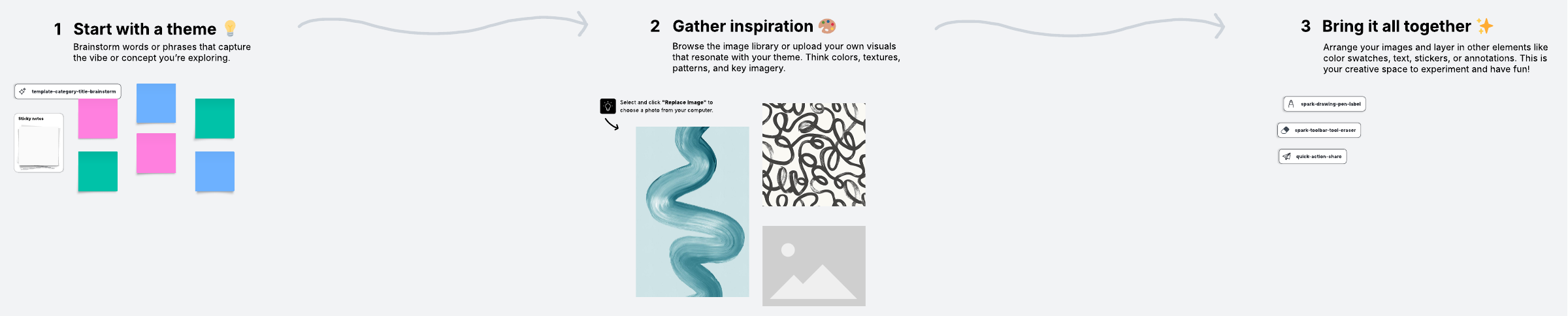
1. Pick your medium
Mood boards can be physical or digital, depending on your needs and preferences. If you stick with an old-school mood board, you can include more than words and images. For example, you can include material samples for people to touch, like textiles or 3D objects.
However, digital mood boards have their own advantages. You can include links and media clips, and it's easier (and often faster) to gather your materials. Online mood boards are simpler to curate from nearly unlimited visual resources and share your board with multiple people, which is especially helpful when you're collaborating across a team.
If you're leaning digital, try Lucidspark for a flexible, collaborative space to brainstorm and create your mood board.
2. Collect your samples
When you begin collecting the words, images, and other materials for your mood board, it's a lot like brainstorming: You need to cast a wide net. Look at materials from various sources. Consider the color palette, textures, and typography. Once you've narrowed the samples, you should have a cohesive set of materials that creates the mood of your project vision.
Common elements include:
-
Photos: Ideally, high-quality images that match your target vision
-
Art: Artist, style, and even time period can shift the emotional tone
-
Words, phrases, or short quotes: Reinforce the feeling you're aiming for
-
Typography: Font choices that communicate personality (such as the mood of Comic Sans versus Times New Roman)
-
Textures: Paper, fabric, craft items, or objects from nature (or photos of them in a digital board)
-
Patterns and shapes: To create—or intentionally disrupt—movement, symmetry, and energy
As you gather options, remember that casting a wide net doesn't mean keeping everything. You can also refine by editing assets, such as adjusting a photo's colors, so they better fit your intended palette and vibe.
Need places to look for materials? Inspiration can come from anywhere—magazines, your own photos or sketchbook, or even nature—but if you're searching online, a few sources can help you narrow quickly:
-
Pinterest
-
Instagram
-
Other brands or websites you admire
-
Artist pages
Pinterest, in particular, can be a useful tool because it aggregates images under so many topics. Simply use their search bar to filter by keyword or follow a specific group, individual, or brand board to find images related to your vision.
3. Arrange your samples on the mood board
Organizing all the samples you collected will take trial and error. Start by placing a key element at the heart of what you're trying to convey on the board as an anchor. From there, you can arrange everything around it, organizing by relationships between samples, hierarchy, and importance.
As you work, feel free to make images work for you. They can overlap, and you can crop them as needed to get them to the right size or to emphasize the element you want to showcase.
The mood board will start out messy. Keep at it until it feels cohesive.
4. Give context
If your mood board is just for you, you don't need to explain your thinking. However, if you plan to share it, try adding context and notes. This is especially easy if you're working with a digital mood board. If you're sharing with a client or a cross-functional team, those notes can also clarify which elements are must-haves, which are exploratory, and what audience or brand attributes the board is meant to reflect.
How to make your mood board effective and visually appealing
To really shine, you'll need to take the time to get your mood board right. Spend time on the following:
Perfecting your vision
The clearer you are about what you're looking for, the easier you'll find it. If you're unsure what vibe you need to create, you may discover it in creating your mood board, but it will take longer. Mood boards are most effective at the beginning of a project, when you're setting direction and establishing a common reference point that the team can return to throughout the work. Additionally, by creating your board early in the creative process, you can avoid future revisions stemming from miscommunication or misunderstanding.
Looking beyond the generic
While you're trying to find your samples, don't just conduct one image search and call it done. Think about what made you want to take this direction with your project. Have you seen previous projects that resonated with you? What characteristics of your target audience are you trying to connect with? Include these sources of inspiration and use them to guide your search.
Staying open
Your mood board will be a work in progress. Keep your eyes open when you're not actively working on it—you never know when you might find just the right piece to go on it.
Being picky
While you have to cast a wide net at the beginning, you'll need to be more decisive as you narrow your samples down. Remove items that don't work. It's better to have fewer, higher-quality samples than a cluttered mood board that's too general to make much of a statement. As you curate your board, only include imagery that precisely nails your concept. Leave the rest out or alter them to fit.
If the board is for a specific brand or client, being picky also means curating through the lens of that audience rather than your personal taste. The better you know your target audience, the better you can tailor your board.
Remember, mood boards are not a prescriptive exercise. They are a tool to get conversations started but aren't necessarily the final iteration of a concept.
Make a mood board in Lucidspark
Ready to make your own mood board? Lucid’s mood board creator has you covered. We offer free templates and an intuitive platform flexible enough to create any type or style of mood board. Try our mood board template to get a head start on your project. Curate your favorite ideas by importing images directly to the canvas or using the platform's built-in image search to find images or icons that convey your ideas.
When you're ready, share your project with your team—Lucidspark lets you collaborate in real time so everyone has a chance to contribute.
Everything you need to whiteboard online
Get the ultimate online whiteboard for teams. Brainstorm, plan projects, and collaborate virtually on Lucidspark’s infinite canvas.
Sign up free