Key takeaways
Companies seeing the greatest ROI from AI are using it to redesign workflows.
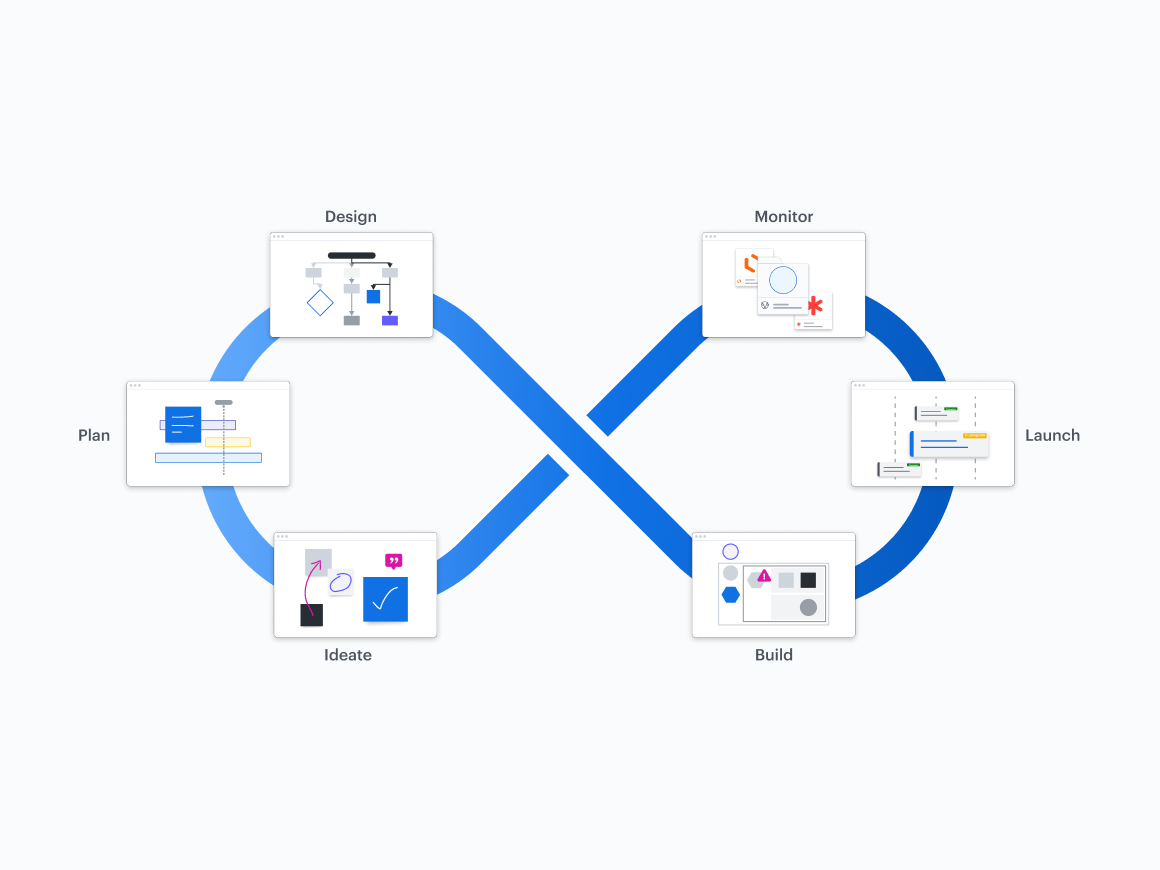
AI can be used across all stages of product development workflows, from ideating, planning, and designing to building, launching, and monitoring.
Implementing AI for product development automates tedious manual tasks, freeing teams to focus their expertise on high-value execution.
AI eliminates "blank canvas syndrome" early in the product workflow by enabling teams to rapidly generate ideas, categorize user research, and synthesize complex working sessions.
Lucid AI offers various capabilities that enable product teams to work more efficiently by generating boards, diagrams, and ideas; finding, sorting, and summarizing content; and connecting to external AI tools via the Lucid MCP server.
Within leading companies, most workers now have access to generative AI tools. But according to a survey by Deloitte, opens in a new tab, only 60% of those workers are using AI in their daily work. So how do companies, and product teams specifically, leverage the power of AI for product development?
Data from McKinsey, opens in a new tab suggests that businesses seeing the greatest ROI from AI adoption are using it to redesign workflows. But that doesn’t mean you have to immediately replace your entire product development workflow in order to realize value. You can take smaller steps and replace parts of your workflow with AI—ideally, the time-consuming, manual parts.
By using AI to get a task even partially complete, your team then has more time for the portion of the task that requires interpretation and decision-making. And, if you apply AI across your product org effectively, the time savings become exponential.
In this post, I’ll share how Lucid product management teams approach AI across the complete product workflow, and I’ll show you how your team can achieve greater efficiency through AI-powered product development.
Who should be in charge of implementing AI across an organization?
First things first: Whose job is it to implement AI thoughtfully?
In many organizations, one person has been designated as the go-to for evaluating and implementing AI tools, which is effective for reviewing data and privacy implications, evaluating vendors, and making other broad decisions on AI strategy. The problem is that it’s more helpful to have specific objectives you can measure against for individual teams rather than a vague, organizational objective such as “deploy AI.” Implementation is often more successful if a few business leaders have a say on how AI solutions will affect the goals they track for their teams or departments.
Think of it as a partnership. For example, a sales leader and customer support leader can evaluate AI tools through the lens of whether they’ll help reps be more productive, while an IT leader can look into the data and security risks of the tools being evaluated. To create business value, the AI tools you invest in need to positively impact goals across the organization.
Implementing AI for a product development workflow, from ideating to monitoring
Here’s how to implement AI in the most time-consuming portions of your product development process, from ideation to monitoring.
Ideating
Jump-start ideas for new features or a new product.
Using AI to generate ideas is a common use of AI, but that’s barely scratching the surface of what you can do. When it’s time to plan new product features, don’t just ask AI for random ideas. Instead, ground it in real project context so it can suggest ideas and next steps that actually make sense for your team.
You can start this process in a product management hub, such as airfocus, opens in a new tab. Using its Insights agent, opens in a new tab, you can aggregate raw context—customer feedback, Zendesk tickets, and competitor notes—to summarize core user pain points and define the strategic value you’re building toward before brainstorming solutions.
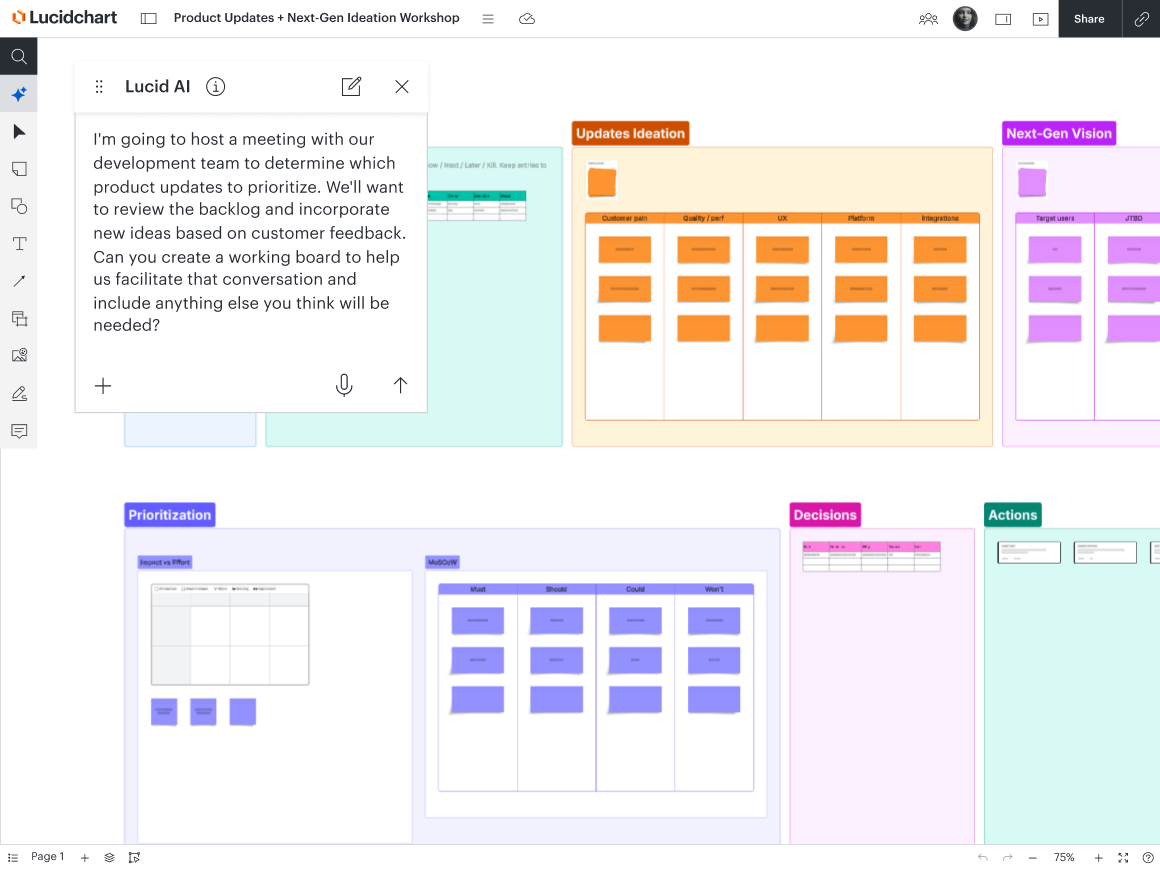
Once those core themes are defined, it’s time to bring them into Lucid for a strategy workshop. This is one of the most valuable parts of using AI in my own workflow. I feed Lucid AI the customer feedback alongside our current backlog, and in seconds, it can generate an interactive visual workspace that includes backlog items (organized by their status), top discussion items, and new feature ideas.
Because AI has already prepped the board, our meeting time is spent on strategic discussion and prioritization. AI helps empower the team, not replace their expertise.
Planning
Sort, summarize, and convert ideas into action items.
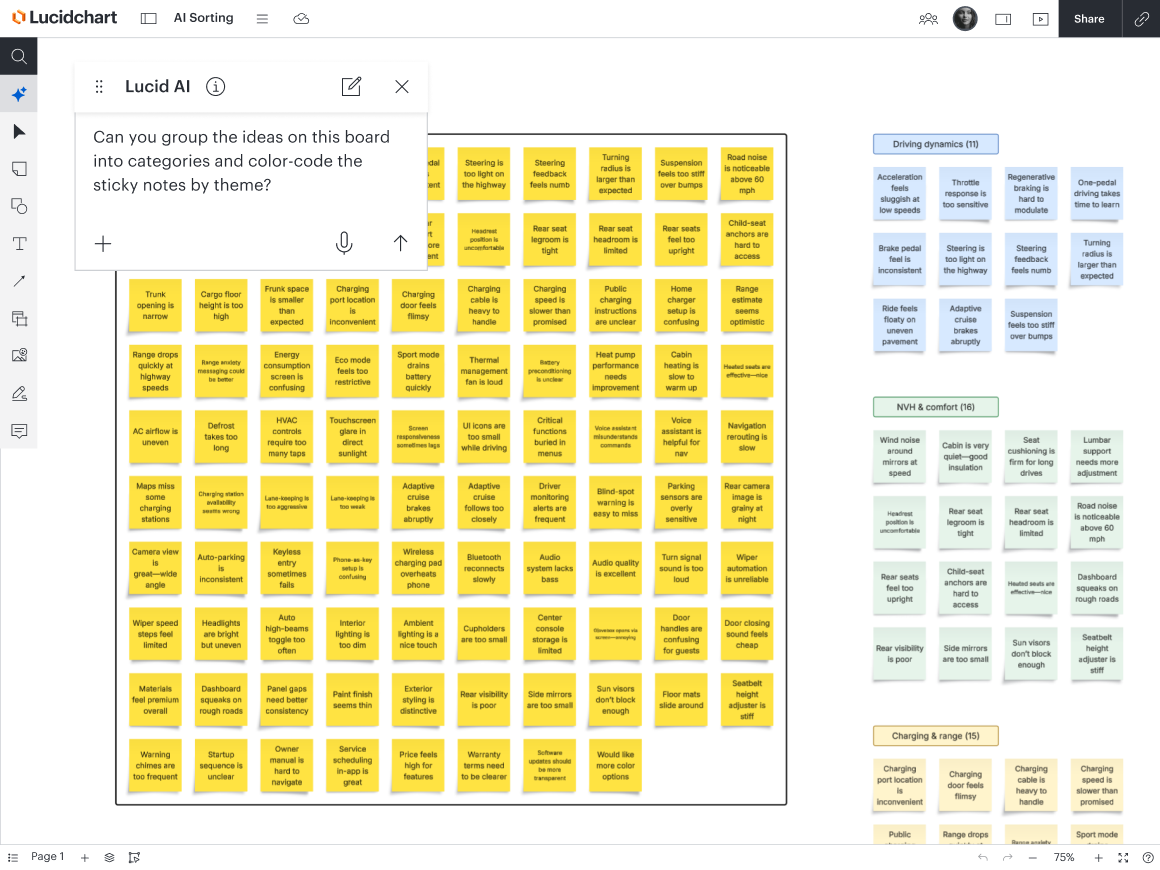
Generative AI can also be useful for the planning stage of your workflow by automatically sorting ideas into themes and generating summaries of ideas or working sessions. This is one of my favorite use cases for AI.
If your team were to brainstorm ideas on a virtual whiteboard like Lucid, you could then use Lucid AI to sort the ideas, opens in a new tab by the criteria of your choice, saving your team a lot of time. From there, simple conversational prompts let you refine those ideas or generate clean stakeholder summaries (of either the entire board or a subset of sticky notes) that capture key takeaways in seconds.
You could do something similar in airfocus as well. You could prompt it and ask, “When you review our documented strategy and insights, what are the main themes that appear?” Whether you use AI in airfocus, Lucid, or another platform, the greatest benefit is that AI can take hundreds of chaotic data points and distill them down to the top actionable trends, giving teams clear boundaries on when to stop discussing and start building.
Teams can also use AI to streamline the transition from planning to execution. Instead of manually retyping sticky notes into your system of record, you can convert your ideas in Lucid directly into actionable Jira issues or airfocus items. If you use an LLM connected via the Lucid MCP server, opens in a new tab, you can take this even further: Ask your AI agent to read the organized board, draft structured user stories with acceptance criteria based on the sticky notes, and automatically push them into Jira or airfocus.
Designing
Automatically generate diagrams.
Once you move on to the designing phase of your workflow, you can auto-generate diagrams, opens in a new tab to document processes and technical systems faster. In Lucid AI, for example, you can type in a prompt to generate flowcharts, sequence diagrams, class diagrams, entity relationship diagrams, and more. Once Lucid AI creates the first version of your diagram, you can keep iterating by providing a file with more context, or you can ask Lucid AI to enhance your prompt and make specific changes.
Or, if you are already working in a platform such as Claude Code or Codex, you can automatically generate diagrams of your codebase in Lucid simply by connecting to the Lucid MCP server.
Using AI for diagramming is valuable if you're starting with existing artifacts, like your codebase, standard operating procedures, written documentation, meeting notes, or even the transcript of a relevant part of a meeting.
A user types "Make an End-to-End Product Development Process diagram" into the Lucid AI prompt, which automatically generates a detailed process flowchart on the canvas.
Find the right documentation.
Another way AI can be used during the design phase is semantic search, which will search across your database for documentation and surface it rapidly. This capability saves time finding the documents you need and helps avoid the issue of institutional knowledge, opens in a new tab. Even if you don’t know exactly what you’re looking for, semantic search will bring up documents relevant to what you type in the search bar.
An example of semantic search is the Microsoft 365 Copilot plugin , opens in a new tabfor Lucid. Users can retrieve Lucid documents without ever leaving Copilot, plus get AI-generated summaries of the documents.
Additionally, the Lucid MCP server allows you to securely connect Lucid and external AI tools, opens in a new tab, such as ChatGPT, Claude, Cursor, and more. You can use this connection to quickly search for Lucid documents within your chosen AI client, grouping results by keyword, topic, and title. Beyond its search capabilities, the MCP server lets you use your AI tools to summarize, edit, and share your Lucid documents.
Building
Automatically translate diagrams into code.
Not only can AI help with ideating, planning, and designing, but it can also help teams build the actual products they’re trying to deliver.
AI coding assistants, such as GitHub Copilot and VS Code Copilot, opens in a new tab, already automate code completion, suggest inline logic, and generate code snippets.
But the real force multiplier for our team is connecting those editors directly to the Lucid MCP server. Instead of developers constantly toggling back and forth to manually translate system diagrams into code, the AI can read our visual blueprints in Lucid directly inside the editor via the MCP.
The AI pulls the specs straight from the diagram—whether that’s an ERD, UML diagram, or system flowchart—to generate accurate database schemas, API endpoints, and type definitions in seconds, ensuring the code perfectly matches the visual designs.
Launching
Automate go-to-market motions.
Once a new product is ready for launch, go-to-market teams can also implement AI to make launches more efficient.
Marketers might use large language models (LLMs) like ChatGPT to generate an outline for promotional content such as emails. Then, the writers on the team can use their time turning the outline into a polished draft. Sales reps, on the other hand, can use LLMs to research a company before conducting customer calls.
Product teams working in airfocus can also use the airfocus MCP to attach airfocus items to their LLM prompts. Instead of marketing teams spending hours hunting down feature details or pinging product managers for updates, they can prompt the LLM using our exact product context, ensuring all go-to-market materials are based on the latest specs.
Monitoring
Synthesize qualitative research.
Generative AI can be used for monitoring, which is the final stage of the product development workflow. After your team has launched a new product, you can monitor its success by conducting qualitative research and using AI to synthesize that research.
If there are consistent elements you always use in your qualitative research, you can configure those into an AI tool so that it produces the output format you’re looking for. Some consistent elements may include:
Key feedback themes
A standard format for customer call summaries
Cohorts of focus groups
Once AI is configured to produce your desired output formats, your team won’t have to spend time sorting through every response to see if it’s applicable or not. AI can come in, get the qualitative research synthesis mostly complete, and then your team can work its magic to implement the research.
This qualitative research synthesis also takes us full circle back to the ideating and planning phases of the product development workflow. Once you know how a new product has been received, you can start ideating and planning future iterations!
The effectiveness of AI lies in your organization’s intentionality. When implemented across an entire workflow and aimed at creating an efficient AI product development process, AI is going to be a better investment for your business than a bunch of one-off tools.

AI in product management
Keep learning how product teams are using AI in Lucid and airfocus.
Read more