Key takeaways
Implementing automation in collaboration provides benefits like faster knowledge sharing, clearer decision-making, and stronger team alignment.
Lucid AI features, including Process Capture and the Process Agent, convert raw workflows into structured visual documentation to clarify processes.
Automated data linking and conditional formatting in Lucid streamline the creation of complex diagrams and accelerate informed decision-making.
Two-way integrations between Lucid and project management tools eliminate documentation gaps and keep cross-functional teams aligned.
On the surface, it may seem that automation and collaboration don’t belong together. After all, collaboration is about connecting people to achieve a common goal, and automation is about removing people from manual processes to improve efficiency.
However, like many daily job activities, true collaboration gets weighed down by time-consuming, repetitive tasks. Creating and maintaining documentation, organizing fragmented ideas, and updating stakeholders take time away from high-value strategic work.
Automation isn’t meant to replace the rich discussion and creative ideation that collaboration fosters. When properly implemented, automation bolsters human collaboration by removing mundane tasks and freeing up time for deeper connection, more thoughtful reflection, and collective problem-solving.
In this article, we’ll explore how smart automation transforms AI into an active teammate, removing administrative friction so teams can focus on high-value strategy and creative problem-solving. We’ll also break down common use cases to streamline visual workflows and keep cross-functional teams aligned.
Benefits of automation in collaboration
As AI and automation become more integral to businesses, unlocking their true value requires treating AI as a collaborative partner. To prepare for effective human-AI collaboration, organizations must first understand their existing processes, set clear boundaries for AI use cases, and build a supportive culture for adoption. When organizations extend automation to collaboration, they can further increase their competitive positioning with these benefits:
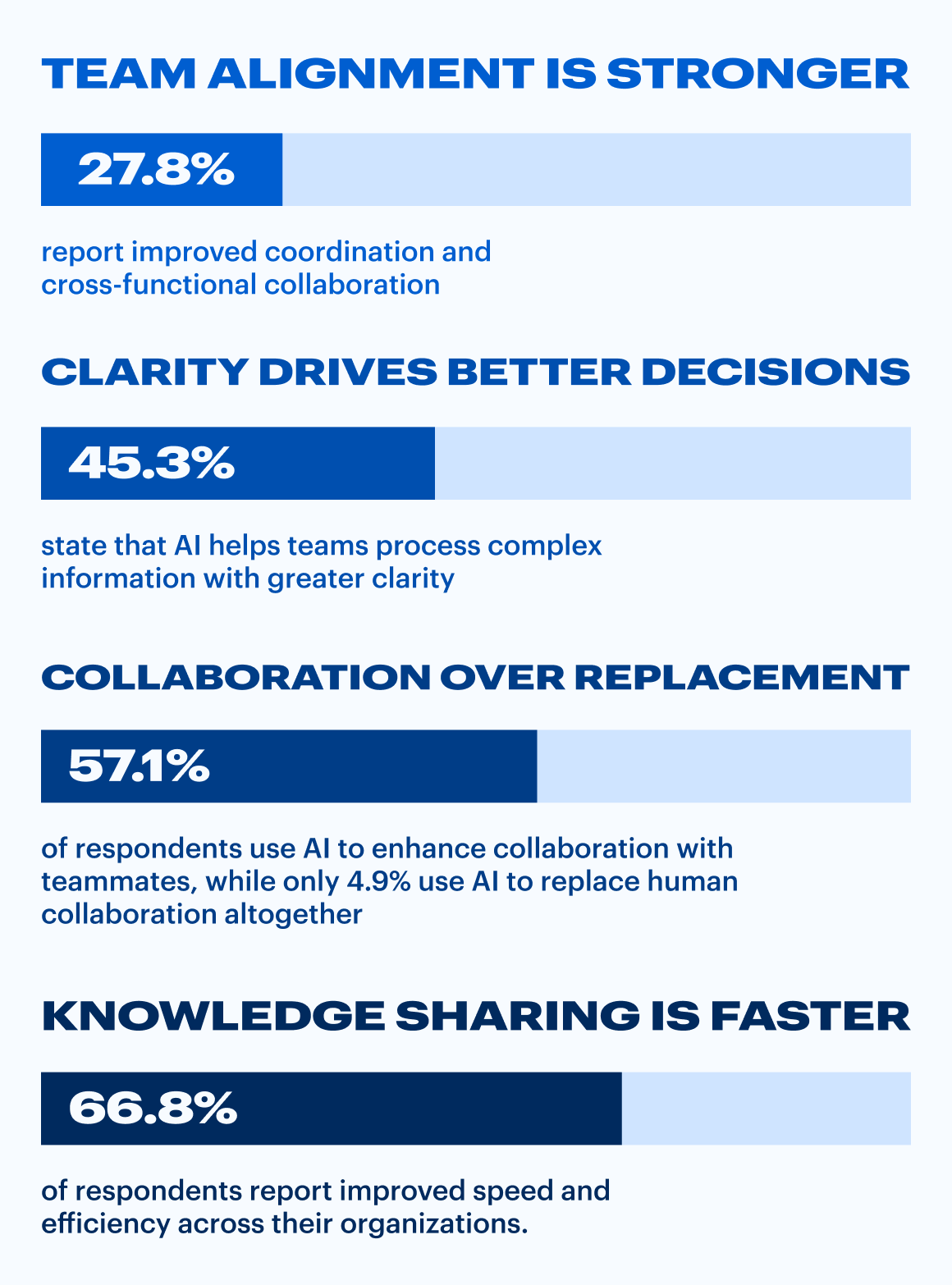
The data reflects this shift toward AI as a collaboration enabler rather than a human replacement. According to Lucid research, when organizations implement automation:
Knowledge sharing is faster: 66.8% of respondents report improved speed and efficiency across their organizations.
Clarity drives better decisions: 45.3% state that AI helps teams process complex information with greater clarity.
Team alignment is stronger: 27.8% report improved coordination and cross-functional collaboration.
Collaboration over replacement: 57.1% of respondents use AI to enhance collaboration with teammates, while only 4.9% use AI to replace human collaboration altogether.
Let’s explore how this translates to real-life use cases.
5 Collaboration use cases powered by Lucid AI
Deciding where to introduce automation can be challenging. Here are five key areas where Lucid's AI features, opens in a new tab, such as Process Capture, opens in a new tab and the Process Agent, opens in a new tab, can eliminate friction and boost team agility.
1. Documenting processes
Thorough process documentation gives teams a clear blueprint for how work gets done, but manually capturing every handoff, decision point, and operational dependency is tedious. Because keeping diagrams updated requires constant effort, documentation often falls behind, leaving teams with incomplete context and universal knowledge hidden in silos.
What to automate: Let AI transform raw, messy workflows into structured, visual process documentation in seconds.
How it works: Use Process Capture, opens in a new tab capabilities in Lucid to automatically convert recorded actions, text descriptions, or raw workflow data into accurate process maps. By pairing process capture with Process Agent, opens in a new tab, you can analyze existing workflows, identify missing steps, and maintain accurate operational blueprints without spending hours manually dragging shapes across a canvas.
Lucid's Process Capture automatically generates a diagram as you record your screen as you move through a workflow.
2. Synthesizing ideas after a brainstorming session
Project planning sessions often generate dozens of creative ideas that stall out because teams lack an efficient way to organize or prioritize them. Manually sorting through dozens or hundreds of sticky notes can be time-consuming and prone to bias.
What to automate: Use Lucid AI to automatically categorize, sort, and summarize ideas.
How it works: Instead of spending hours organizing post-meeting notes, Lucid AI categorizes ideas by topic or sentiment and drafts immediate next steps. This turns raw brainstorms into actionable execution plans instantly.
sort ideas with Lucid AI
3. Generating and updating complex diagrams
Whether you’re building org charts, account maps, or entity relationship diagrams (ERDs), diagrams are an effective way to collectively visualize systems, processes, and connections. They’re often a launching point for discussion, helping teams and stakeholders reach a shared understanding of the current state and identify areas for improvement.
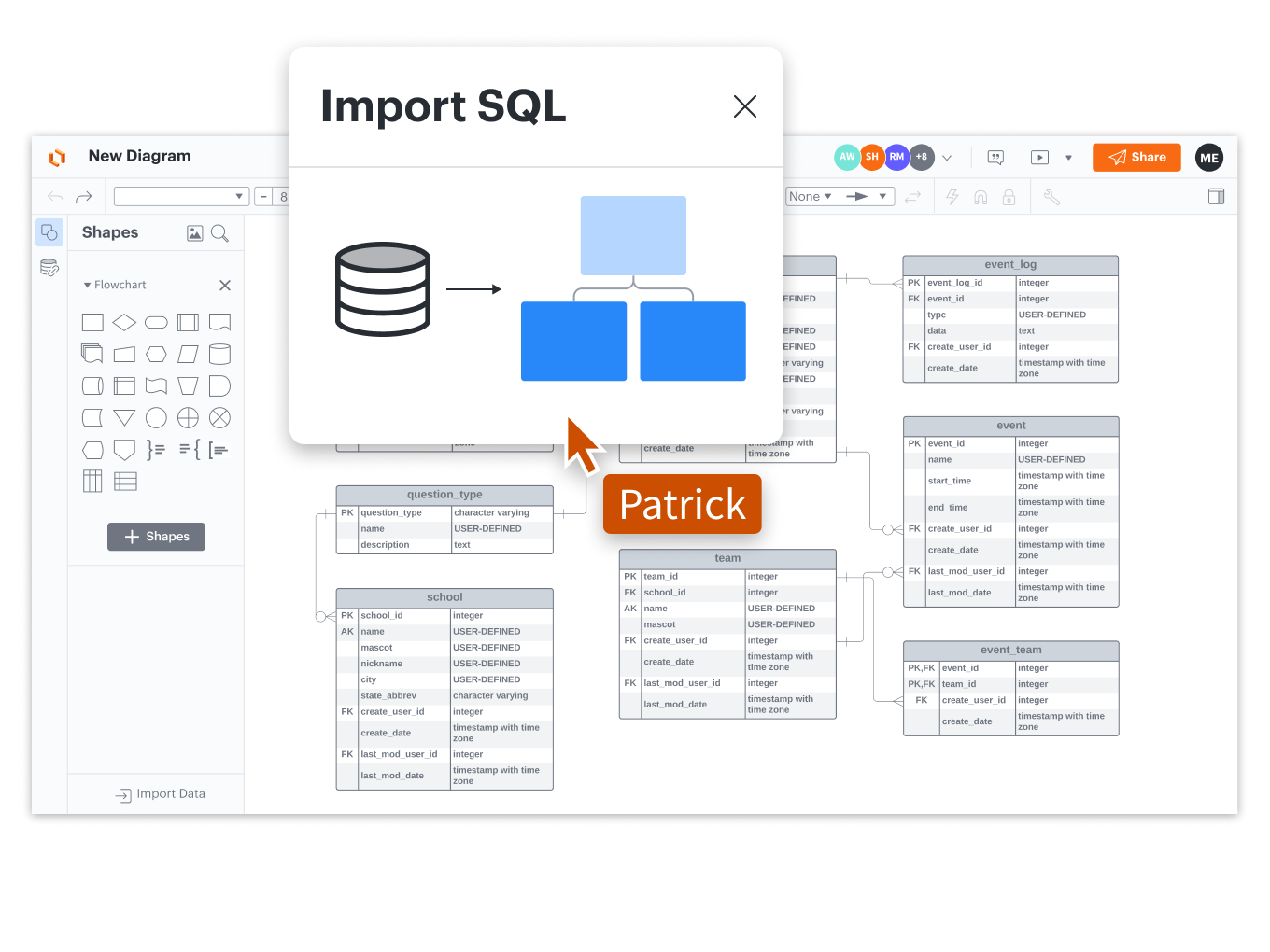
What to automate: Automation can be a huge time-saver when building data-driven diagrams, opens in a new tab. By automatically importing data directly from where it lives—whether that’s Microsoft Excel, Google Sheets, Salesforce, BambooHR, or another system of record—into the platform you collaborate in, you can create diagrams nearly instantaneously.
Best of all, when data is linked between your collaboration platform and the original source, your diagrams always reflect the most up-to-date information without any manual upkeep.
How it works: In Lucid, you can easily generate a diagram, opens in a new tab by typing a simple prompt.
4. Interpreting data to make informed decisions
Creating a process map or system architecture is only step one; interpreting that data to make confident decisions is where teams often encounter delays. In fact, research shows knowledge workers spend significant time navigating complex, disconnected data.
What to automate: Apply automated conditional formatting rules and AI summaries to highlight operational bottlenecks or status updates instantly.
How it works: Set custom visual rules in Lucid—such as changing a shape's color or adding visual flags—when specific conditions are met. Then, use the summarize feature to generate an instant text overview of complex technical diagrams, helping stakeholders understand the current state and make informed decisions faster.
generate diagrams in Lucid
5. Maintaining alignment across documentation and project management tools
Cross-functional alignment often breaks down when project details are spread across multiple platforms. Manually copying and pasting status updates between visual canvases and project management systems creates documentation gaps and leads to misalignment.
In fact, according to a study commissioned by Lucid, many organizations struggle with information sprawl:
40.3% of respondents report that knowledge is spread across multiple disconnected tools.
18.9% say organizing information has become more challenging in AI-enabled environments.
50.8% describe their documentation as functional but incomplete, while 21.6% note that inconsistent documentation produces unreliable AI outputs.
4.7% report that incomplete documentation actively creates barriers to accurate AI performance.
What to automate: To maintain momentum and stay aligned, teams need a way to automatically transfer project information from a collaborative platform to their preferred project management tool.
How it works: Establish two-way syncs, opens in a new tab between Lucid and tools like Asana, Jira, or Smartsheet. Changes made on the visual canvas update task statuses in your project management system automatically, keeping remote and hybrid teams aligned without administrative overhead.
Make collaboration automation a reality
Successfully modernizing your workflows requires a comprehensive visual collaboration platform with built-in intelligence. When ideation, process mapping, data linking, and automated synthesis happen in one centralized location, you create a living blueprint of how your business operates.
By choosing a work acceleration solution like Lucid, you equip your organization to streamline manual tasks, strengthen team alignment, and unlock the true potential of human-AI collaboration.

Learn more ways to leverage Lucid AI throughout the workflow to boost collaboration and alignment.
Learn more