
As more and more companies prioritize digital transformation, transitioning data and applications to the cloud is top of mind for many organizations. However, establishing and maintaining cloud infrastructure comes with many challenges—from streamlining documentation to ensuring that communication is clear, even with non-technical stakeholders.
The Lucid Suite is a one-stop solution for cloud initiatives, helping organizations around the world visualize their cloud infrastructure, troubleshoot issues, maintain compliance, and more. Whether companies need a more complete picture of their cloud infrastructure or need to craft easy-to-understand diagrams for stakeholders, Lucid helps centralize documentation and accelerate cloud transformation.
Check out these six real-world examples to see the different ways that Lucid can help streamline and execute cloud initiatives.
Creating conceptual cloud infrastructure designs
As the first step to transitioning to the cloud, many organizations need to visualize new concepts for application architecture. A visual representation of how cloud infrastructure will operate is crucial for fostering alignment, enhancing understanding, and streamlining communication across teams and stakeholders, especially for complex systems that involve many moving parts.
With Lucid, it’s easy to design future cloud architecture so that you can envision a future state thanks to Lucid’s diagramming capabilities. Teams can create a conceptual design in Lucid, then use Lucid as a single source of truth to capture feedback from colleagues, compliance teams, and stakeholders. This makes it easier to ensure that a design meets compliance and security requirements before moving forward.
As a real-world example, at Ensono Digital, senior consultant Dusan Nitschneider uses Lucid as his go-to solution when he works on conceptual cloud infrastructure designs for clients. First, he uses Lucid to create a basic depiction of high- or low-level infrastructure, using different tabs within the same board to display varying levels of detail. The result is a unified view of a system—something that wouldn’t be possible with a single canvas.
Then, Nitschneider uses dynamic shapes and smart containers to display application and networking components of the cloud infrastructure. He presents the final visuals to clients and stakeholders so he can gather feedback before iterating on the diagram. Lucid makes it easy to share his diagrams with other people, whether it’s using presentation mode to walk viewers through the architecture, embedding his diagrams with other living documents, or exporting them as PNGs to embed in markdown. According to Nitschneider, Lucid has resulted in significant time savings for him and his team, increasing the velocity at which they can turn out artifacts:
“[By using a Lucid diagram], it’s very quick to just draw something out and everyone just kind of gets it right away. That makes life a lot easier than having to explain a concept.”
—Dusan Nitschneider, senior consultant, Ensono Digital
Documenting existing cloud infrastructure and validating migration
Before you can begin to make changes to your cloud infrastructure, you need to first understand the current state, visualizing what resources you have, how they’re used, and how they connect.
Capturing the full environment of your cloud infrastructure is easier with visuals rather than a static dashboard. Thanks to Lucid’s Cloud Accelerator add-on, you can automatically visualize and share existing cloud infrastructure, reviewing updates in real time so you can fully understand complex designs. By using Lucid, teams are able to make data-informed decisions and effectively plan changes to their infrastructure.
At Informatica, a software company for enterprise cloud data management, Lucid is an essential platform for thorough, up-to-date visibility into existing systems within Informatica’s network. By leveraging Lucid for cloud visualization, Informatica gains powerful insights into a complicated system, getting a high-level overview of where certain elements live, why they matter, and how they can affect other systems and processes downstream.
Using Lucid to maintain visibility into existing systems empowers Informatica employees to:
-
Troubleshoot faster
-
Conduct thorough security cap analysis
-
Make more detailed work evaluations
-
Provide more informed recommendations
-
Make smarter network decisions and changes
“By visualizing current systems, my team is able to replace static drawings with what’s really out there in the world, in a meaningful way. This ultimately ensures [we] communicate the appropriate recommendations and changes as necessary.”
—Toby Foss, director of cloud network operations, Informatica
Lucid can be used to not only visualize your current state but also guide and validate migration. For example, Ensono Digital uses Lucid to guide implementation of changes to cloud infrastructure and validate that those changes have been completed. After delivering a solution to a customer, the company has to provide proof of the changes that were made. Ensono can create diagrams in Lucid and import accurate architecture, ensuring that up-to-date changes are reflected. By using Lucid instead of recreating artifacts from memory or checking over code, Ensono’s team estimates that they save several days of work.
Standardizing cloud migration
As businesses focus on digital transformation, they're migrating some—or all—of their business applications and data to the cloud, a process that often is very complicated and time-consuming. At some companies, cloud migration can take years as teams design new infrastructure, ensure security compliance, undergo audit reviews, and more. Streamlining this process and standardizing cloud migration ultimately provides greater security, flexibility, and scalability, as well as reduced costs.
To accomplish this, many companies have used Lucid to standardize their cloud migration. For example, a financial services company has used Lucid to focus on migration to AWS Cloud infrastructure, opens in a new tab. Under the leadership of the CTO and CIO, the company sought ways to streamline and standardize processes across the organization, transitioning from multiple tools to Lucid, where they can make faster, data-driven decisions across their cloud architecture strategies. By centralizing documentation, the company ensures rapid access to the latest information.
The architecture team at this organization has leveraged Lucid to streamline their infrastructure design process by adopting more efficient workflows, reducing errors, and improving the pace of decision-making. The platform team has worked with agility, significantly accelerating the overall design process. At this company, cloud migration design process teams have realized time savings of 25%-50%, and enterprise architect project teams have saved about $500,000 per year by leveraging real-time collaboration in Lucid.

How to execute a successful cloud migration strategy
Learn how to migrate to the cloud with this complete checklist.
Go nowCommunicating clearly with stakeholders
Whether companies are tasked with building something new, making changes to their existing infrastructure, or troubleshooting, communication is often one of the biggest challenges to cloud initiatives. Even the smallest change to cloud infrastructure can significantly impact departments and stakeholders. Not only do teams have to identify those impacts, they need to be able to communicate the changes in a clear way that everyone can understand, regardless of whether stakeholders are technical or non-technical.
Thanks to Lucid, companies like Informatica are able to create diagrams that enhance understanding and facilitate communication across the business. Informatica uses Lucid to relay architecture designs to developers during shift changes and handoffs, as well as in high-level network presentations for executives who often only want to see the big picture. In Lucid, it’s easy to create a high-level overview of cloud infrastructure that shows the flow of data and more detailed diagrams that include Terraform scripting, subnets, and IPs for technical implementation teams. At Informatica, Lucid functions as a great resource that helps get everyone on the same page.
On top of this, thanks to Lucid’s Jira and Confluence integrations, any changes made to a diagram in Lucid are automatically reflected in the existing system of record. When stakeholders view cloud infrastructure, they know they’re looking at diagrams with the most up-to-date information, further ensuring communication and clarity across the board.

How cloud visualization improves alignment
Learn how visualizing your cloud infrastructure can help build understanding during cloud migration.
Read moreDeveloping efficient troubleshooting processes
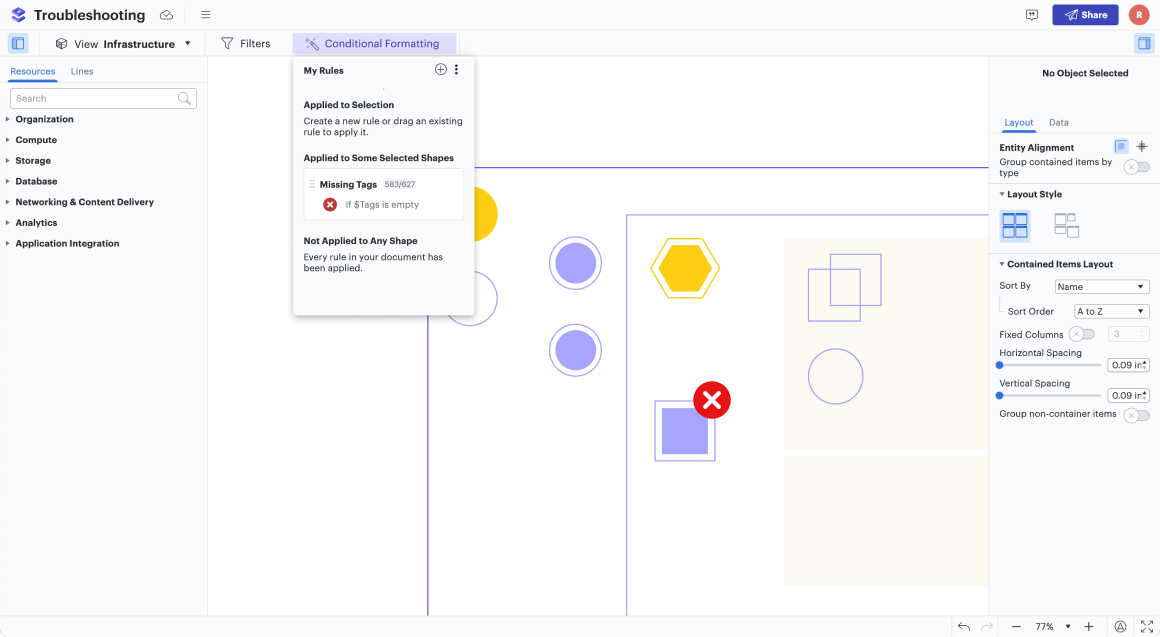
Troubleshooting cloud infrastructure requires a methodical approach to identifying and resolving issues, such as monitoring data, verifying connectivity, and addressing security measures. With Lucid, companies can keep accurate, up-to-date documentation of network diagrams to help facilitate troubleshooting and guide technical questions.
Informatica, for example, uses Lucid to troubleshoot faster since Lucid provides visibility into existing systems. Creating diagrams in Lucid helps keep track of troubleshooting changes, issues to be resolved, and what’s been completed. Network diagrams can also help answer more detailed troubleshooting questions, such as:
-
What subnet is it in?
-
What VPC is it in?
-
What routing table is it using?
-
What is the IP of the actual box, and how is it routing?
-
Where is it going, and where is it getting stuck?
Since diagrams of individual components are rarely ever stand-alone and instead are part of an ever-changing, dynamic ecosystem, it helps to use Lucid to visualize an entire network. At Informatica, in the case of an issue with Google Cloud or Amazon, an employee can take a network diagram and attach it to a ticket to show where exactly the problem is. This context not only helps inform other teams, but it also helps other vendors troubleshoot in real-time as well, ensuring that troubleshooting processes are efficient throughout the system.
Ensuring and maintaining compliance
Cloud compliance can be complicated: It involves adhering to international laws, regulatory requirements, and industry best practices for cloud computing. In order to ensure compliance, companies need to make sure that their cloud services and data meet privacy and security standards, which involves regular audits and continuous monitoring. Compliance standards also constantly change, with new benchmarks and regulations being introduced. Many organizations are uncertain about their compliance obligations, how to define them, and how to maintain them. Luckily, cloud compliance is another aspect that Lucid can help with.
For example, at a top global insurance company, Lucid diagrams help ensure disaster recovery compliance. With Lucid’s Confluence integration, teams can easily reference up-to-date visuals of their application architecture, validating that systems are correctly configured in the case of unforeseen issues. The ability to reference the systems visually has significantly reduced the time and effort required for compliance review activities, enabling teams to work more efficiently and effectively. One architecture team alone saved an estimated 200 hours per year on disaster recovery compliance certifications by using Lucid.
At Informatica, Lucid is also a valuable compliance asset. Informatica uses Lucid to provide architecture diagrams as evidence throughout compliance audits, and these diagrams can even be used as a regular internal compliance checklist.
Additionally, Informatica has to prove FedRAMP compliance by completing a System Security Plan (SSP), which includes demonstrating what the architecture looks like, how to support it, and how to maintain it. The required documentation has to include varying levels of detail, which can be accomplished in Lucid. Informatica creates both simple flow diagrams of how their system works and detailed diagrams of particular aspects of their service, including both types of documentation for audits. Maintaining architecture documents in a central location ensures that compliance isn’t a point of friction or concern, but a formality that simply requires diagrams that clearly outline compliance.

How Lucid helps companies meet compliance requirements
Learn how Lucid simplifies compliance readiness for government agencies and contractors.
Read moreUse Lucid for your cloud initiatives
Is your company exploring digital transformation and considering cloud migration or optimization for all of your data and applications? As you’ve read, Lucid can help streamline cloud initiatives, from visualizing existing architecture to standardizing and troubleshooting migration to maintaining visibility and security, opens in a new tab. Lucid’s work acceleration platform and Cloud Acceleration add-on helps companies achieve agility, clarity, and alignment while working in the cloud. Contact us today to see how Lucid can help you optimize your cloud initiatives—even with complex designs.

Boost collaboration and efficiency with Lucid
See how Lucid can help you better visualize and understand your cloud initiatives.
Contact us