Picture this: Your team member comes to you with a new product idea. It sounds great. But how exactly will it work? At this point, most teams dive right into the brainstorming phase, generating ideas for fancy features, cool applications, and modern design.
But jumping straight into brainstorming means you miss asking important questions and considerations that could make or break your new idea. For instance, who is this product for? What problems does it solve? When will it launch?
While you can ask questions during a regular brainstorming session, without a clear system to evaluate them, it’s too easy to ask a few random questions and move on. To really assess your idea, you need a comprehensive method for asking the right questions so you can get the best answers.
Enter starbursting.
Starbursting is a brainstorming technique that helps teams evaluate and validate ideas by asking questions.
In this article, we’ll cover what starbursting is, why you should use it, and how to use starbursting to produce better ideas, make better decisions, and solve problems more effectively.
What is starbursting?
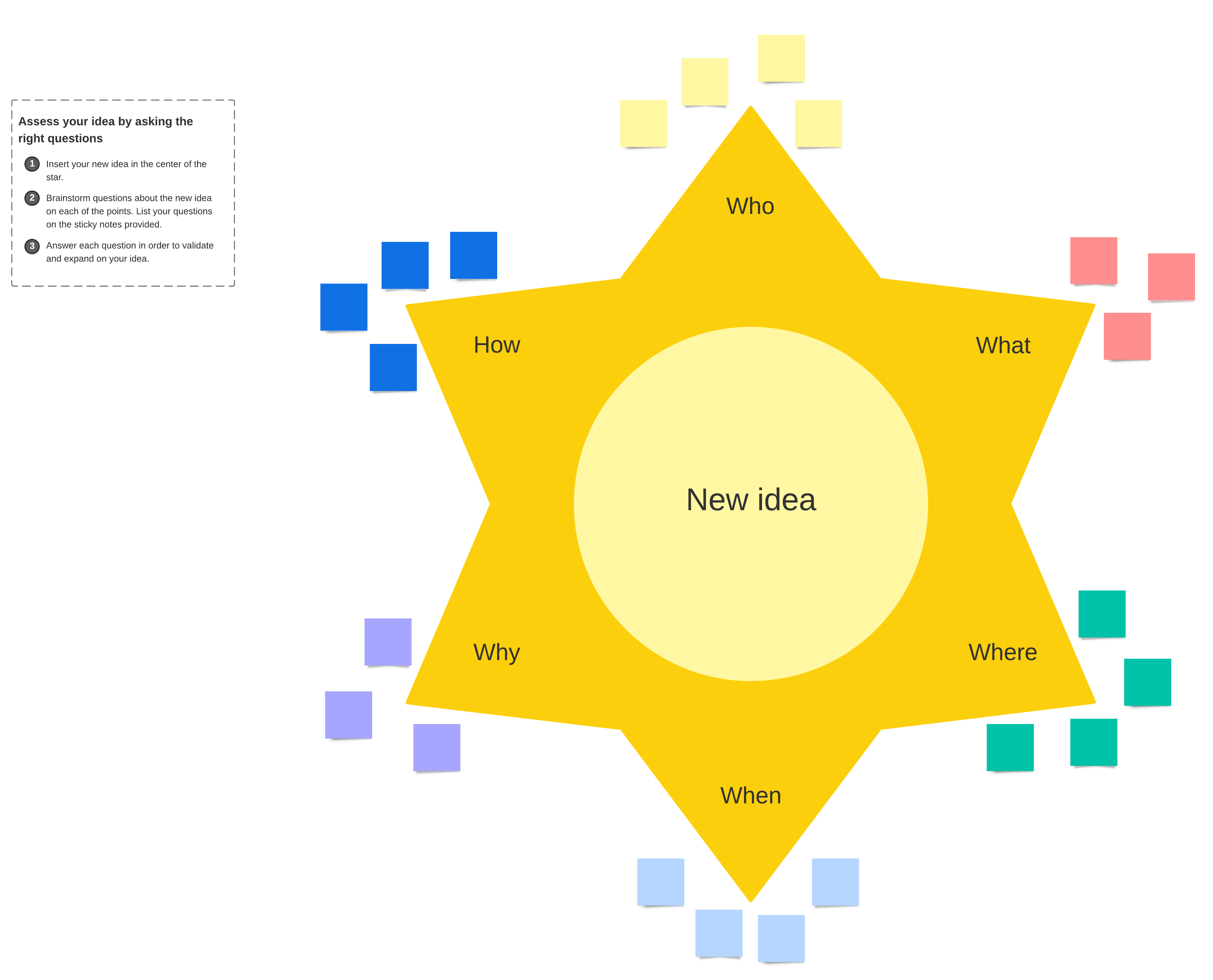
Starbursting is a systematic brainstorming method that focuses on asking questions rather than immediately seeking answers to assess new ideas. The goal is to generate key questions based on a simple but structured brainstorming framework modeled in the shape of a star.
The star has six points, each point representing a different question group:
- Who
- What
- When
- Where
- Why
- How
The team then brainstorms together to ask questions under each point, such as, “Who will use this product?” or “What does the application cost?” Brainstorming questions under each point helps the team comprehensively assess their idea and consider it from all angles.
Why would you use starbursting for brainstorming?
Starbursting is a great technique for decision making and problem solving. It helps teams explore solutions by asking deeper questions that enable them to strategically plan and execute their ideas more effectively.
In other words, by asking the right questions, teams can ensure they produce the right solutions. Starbursting helps teams brainstorm which questions to ask so they can confidently (and thoroughly) test the validity of the idea itself.
The technique is intended to generate many questions under each point—often dozens per group. This helps the team assess new ideas in a systematic and iterative way, providing the foundation for good decision making and a clear direction for moving forward.
How to use the starbursting brainstorming method
Starbursting isn’t just effective, it’s surprisingly simple. Follow these five steps to use the starbursting method:
-
Outline a six-pointed star.
The first step is to map out your star with six points, leaving space in the center. You can draw it on paper, a whiteboard, or a shared digital canvas like Lucidspark.
Depending on how you want to approach the session, you can work from one shared model or have each team member fill in their own star individually and then share their questions with the group.
2. Fill in the question groups and the central idea or problem.
Once your star is outlined, fill in the question groups (already provided in the template above)—one per point on the star:
- Who
- What
- When
- Where
- Why
- How
At the center of the star, write down the main idea or problem you’ll be focusing on for this brainstorming session.
3. Assign a facilitator.
The facilitator is in charge of managing the discussion so that everyone stays on task and uses the time effectively. This is especially important for an open-ended method like starbursting where the group is asking questions that can lead the discussion down rabbit holes. It is the facilitator’s role to assess relevancy and decide how to address questions. Sometimes this means tabling questions for later or redirecting the group to focused questions that are more on target.
4. Brainstorm questions under each point.
Start brainstorming questions for each group. For example, under “Who” you might ask:
- Who is the target audience or customer?
- Who will work on this new product?
- Who are our competitors?
Starbursting is intended to generate many questions, so encourage your team to share whatever comes to mind. You can filter through them as needed later.
Optional: Break out into six separate brainstorming groups.
Depending on the size of your team and your brainstorming preference, you can break out into separate groups—one for each question category.
Each group would then brainstorm questions just for their assigned category (i.e., Group A answers the ‘why’ questions and Group B answers the ‘what’ questions, etc.). Then, once everyone has prepared their questions, you can bring the group back together to share what each team came up with.
5. Answer the questions as a team.
When you have enough questions for discussion, it’s time to start working through your list and systematically answering them. This is when a facilitator will need to pay attention to the conversation to make sure the questions are relevant and the discussion stays productive.
By the end of your starbursting session, you should have a comprehensive list of questions (and answers) that add clarity and direction to your central idea or goal.
Tips for making the most of starbursting
Like any brainstorming method, starbursting requires careful moderation of people and time management. Keep your team on task and get the most out of your starbursting meetings with these tips:
Set time limits.
Starbursting is open-ended by nature, which can easily lead to wasted time or tangential discussions. Plus, since there are an infinite number of questions you could imagine, it’s helpful to set a time limit on how long the team can brainstorm. Time limits help keep minds focused on the task and prevent overwhelm.
Break the session into two meetings.
Don’t be afraid to break up your starbursting session into two meetings: one for asking questions and the other for answering them. This gives the team a chance to mull over their ideas, and come ready to participate fully each time.
Have individuals write down questions silently before sharing as a group.
As with other brainstorming methods or group meeting dynamics, it’s easy for starbursting to become a discussion dominated by just a few voices.
To ensure all personalities have a chance to contribute equally, consider having your team write down their questions silently. Then go around the table and have each person share their ideas.
Have the team add to the chart over a few days
Another approach is to share the starbursting diagram for team members to add to over time. For instance, you can leave the chart on a whiteboard in a common room and have team members add sticky notes with their questions on it throughout the week.
This gives the team time to think through the idea more thoroughly and gives people a chance to brainstorm when their mind is most focused—which is different for everyone.
Use a digital canvas like Lucidspark to share and record ideas.
Brainstorming is made easier with digital solutions like Lucidspark. Lucidspark is a visual collaboration workspace that enables teams to brainstorm on a shared digital whiteboard.
Ready-made templates, drawing tools, sticky notes, and a shapes library make it easy to quickly draft a starbursting model, add notes, and vote on your favorite ideas—all in one place. Plus, features like @mentions to tag team members and the timer to keep everyone on track helps leaders facilitate discussion, and keep the ball rolling so you get the best ideas out of your people.

Get started with Lucidspark today.
Start now