In 2024, 78% of companies said they had adopted the cloud in most or all areas of their organization. So if your company isn’t doing business in the cloud, chances are it will be soon.
Cloud application migration makes sense, but it can be tricky, cumbersome, and cause business disruptions and downtime. When the cost of downtime can mean over $1 million per outage in some industries, nobody wants to perform activities that will disrupt current business practices.
In this article, we’ll discuss strategies to help you move applications to the cloud while keeping your business up and running.
Reasons to migrate applications to the cloud
Companies are moving applications from local, on-premise data centers to the cloud to take advantage of benefits such as:
-
Security: The cloud might seem less secure than an on-site server, but because providers invest a lot in security and security management, it is often more secure and more consistent.
-
Elasticity: Cloud environments are very flexible and can scale up or down based on demand.
-
High availability/mobility: The cloud makes your applications available at any time from any location on any device.
-
Remote collaboration: Data and documents are available at all times from all locations. Now virtual teams can use solutions like the Lucid Suite to access and collaborate from anywhere in real time.
-
Redundancy/fault-tolerance: Your cloud systems are backed up regularly to multiple secure locations across multiple geographic regions. This reduces your susceptibility to costly downtime.
-
Reduced costs: You don’t have to worry about maintaining legacy equipment or purchasing new, expensive hardware, because the cloud is maintained and updated by other organizations.
Common challenges of moving applications to the cloud
Cloud migration comes with a lot of benefits. But migrating apps to the cloud comes with its own set of challenges. A few common challenges you might encounter include:
-
Disruption of business processes: When moving applications to the cloud, you’ll want to focus on the ones that are vital to your business. These apps tend to be the ones that get used the most. To avoid interrupting mission-critical processes, which can frustrate employees and customers and cost you a lot of money, plan your migration during off-peak hours.
-
Data synchronization and integrity: The goal of any migration is to ensure that employees and customers can continue working with apps and data as if nothing has happened. Achieve this by performing frequent integrity checks to ensure your data isn’t corrupted or lost during migration.
-
Cost: Because migration can be expensive, you’ll want to make sure that you migrate the apps that are crucial to your business. That’s why application migration is a good time to evaluate apps and retire those that aren’t used anymore.
-
Unplanned circumstances: Migrations rarely go as planned, even when you have a really good plan in place. It may take longer, use more resources, and cost more money than you planned for. Hiring a migration specialist can help you stay within your planned timeframe and budget.
How to migrate applications to the cloud
Cloud application migration is not an easy process. To make it as painless as possible, reduce employee resistance by ensuring everyone understands the benefits and obtaining executive buy-in. The following steps help to make the migration go smoothly.
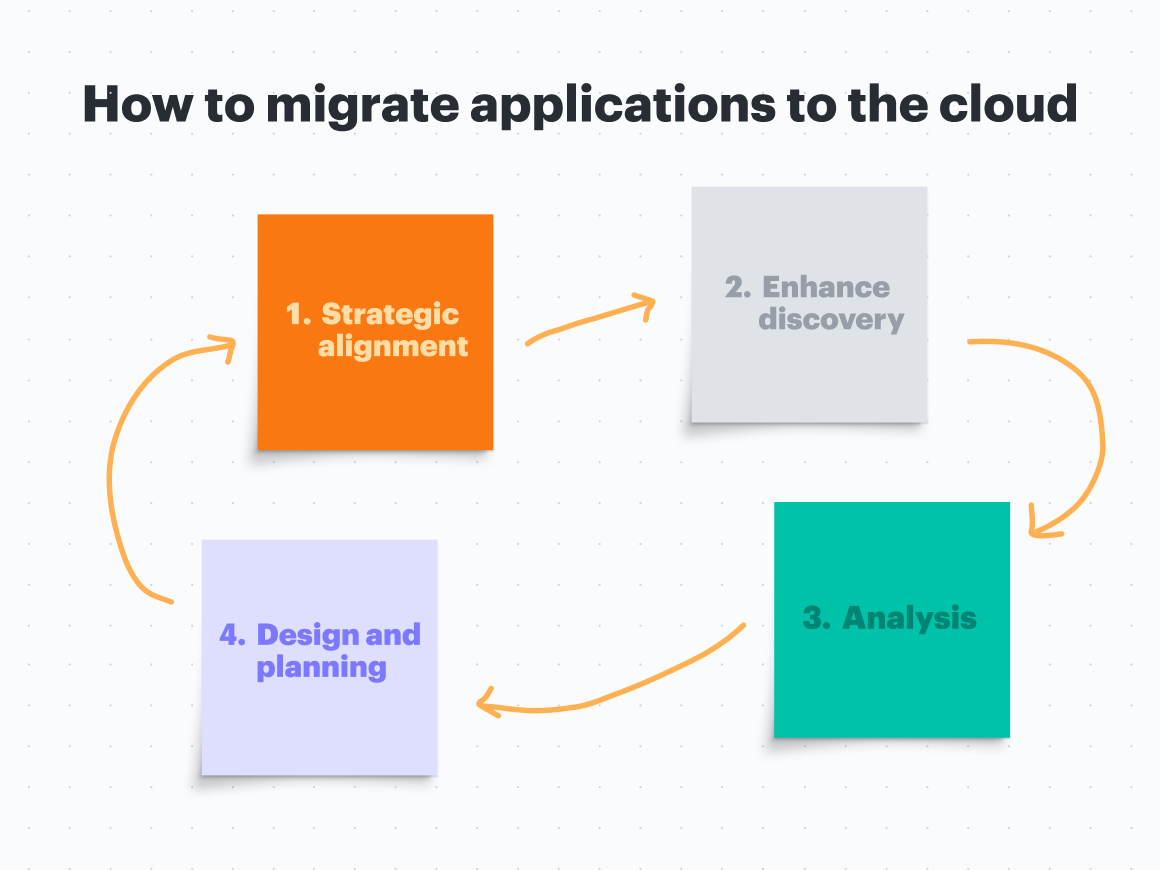
Step 1: Strategic alignment
Here you’ll evaluate why you want to migrate your applications to the cloud.
-
What are the business cases or events driving the migration?
-
What are your organization’s goals?
-
What are the necessary requirements?
-
Which partners and vendors will help you on this project?
If you can, enlist the help of people who have experience with application migration to the cloud and build off of their experience to form your business use cases.
During this step, it's important to communicate and collaborate with teams across departments so everyone knows what to expect. As you begin planning, you’ll want to gain insight into your processes and understand how things work so you can get a better idea of how you want things to work after moving to the cloud.
Consider using our free strategic alignment meeting agenda template to lead this collaboration and ensure all stakeholders are on the same page before moving forward.
Step 2: Enhance discovery
In this step, you want to gain knowledge of everything in your environment.
-
What applications do you have and where are they located?
-
What kind of licensing and service-level agreements are associated with these apps?
-
What are the interdependencies of all of your IT resources?
-
Which applications are mission-critical?
-
Which applications need to be migrated first?
Use this information to outline your migration plan for each application. Lucid comes equipped with hundreds of valuable templates, making it easy to map and visualize all of your applications and interdependencies so you can understand the complexities of your current system.
Step 3: Analysis
Here is where you’ll take a deep dive into your current system to review and understand the dependencies between applications, databases, servers, networks, and so on. The idea is to build a portfolio of applications, IT assets, and their dependencies.
When you understand how all of these components fit and work together, you’ll have a better understanding of which assets must remain linked together during migration. You’ll also better understand which assets can survive a temporary separation from their dependencies during migration.
Step 4: Design and planning
This is where the fun begins. You take grouped applications and components from the portfolio and plan when and how you will move them to the cloud. Migrating complexities vary.
If you are new to this, you might want to start with the least complicated applications. For example, applications without dependencies on other assets might be easier to migrate while you are learning. This gives you confidence as you move to bigger, more complex applications and asset groupings.
As you build your migration strategy, take into consideration the five pillars of a well-architected cloud framework:
-
Security: Protect the confidentiality and integrity of information, systems, and assets.
-
Reliability: Emphasize fault-tolerance, the ability to quickly recover from failures to meet demands.
-
Performance efficiency: Leverage IT and computing resources efficiently to meet system requirements and select the right resources based on workload requirements.
-
Cost optimization: Understand and control how your money is spent.
-
Operational efficiency: Run and monitor systems to deliver business value and continuous process and procedure improvement.
Lucidchart’s six cloud migration strategies template can help you build migration strategies based on the six most common cloud application migration strategies: rehosting, replatforming, repurchasing, rearchitecting, retaining, and retiring.
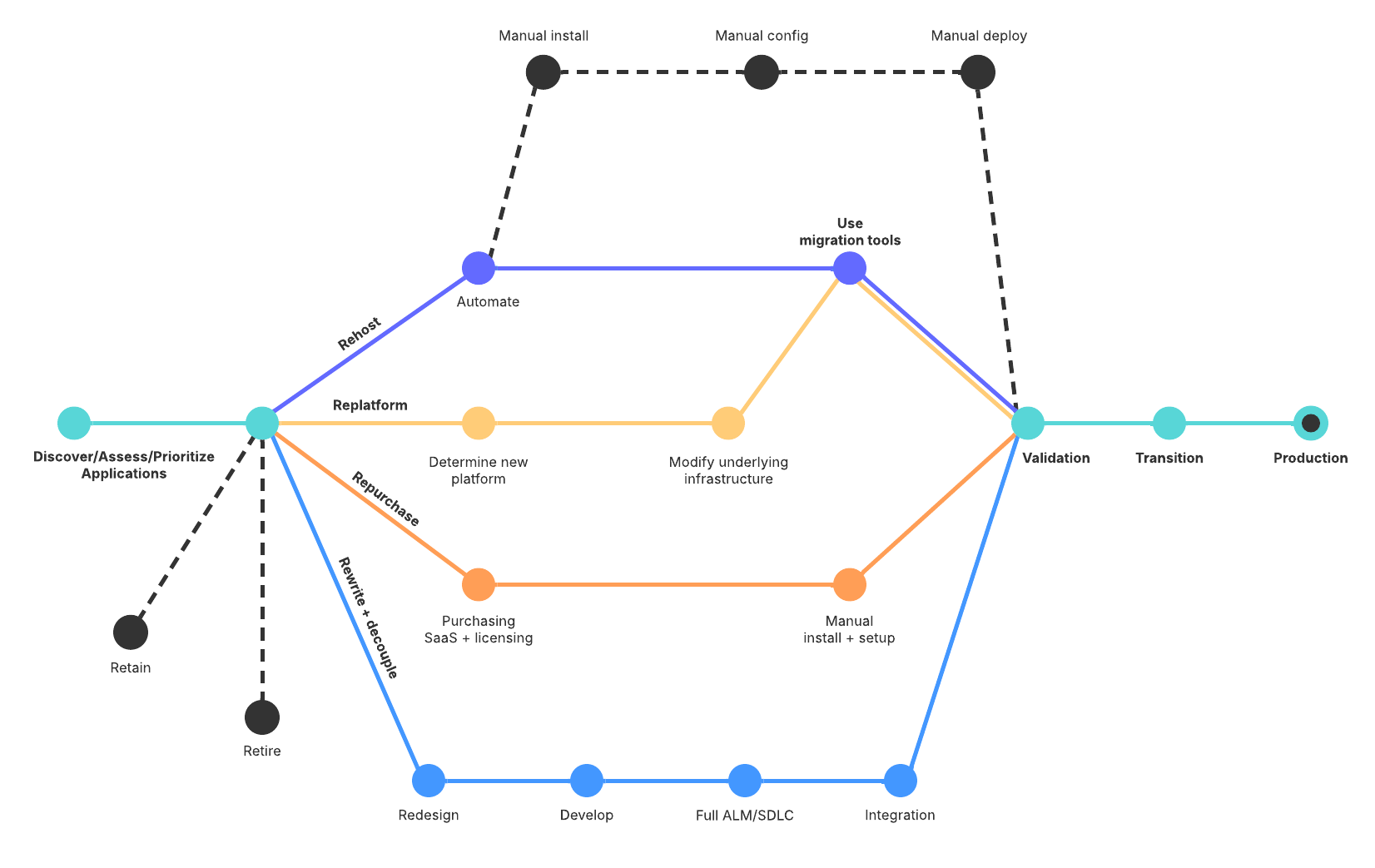
Step 5: Execution
When you’ve gathered all of your data and created your plans, it’s time to start migrating applications. Minimize the impact that migration might have by avoiding migrating mission-critical applications during peak business hours. In a global enterprise, peak business hours can come at many different times of the day. You’ll need to assess which times will have the least impact in each location.
It also might be helpful to create different teams that focus on specific types of migration. For example, you might have teams dedicated to application types (such as email, websites, etc.), applications specific to different business units, and teams that specialize in specific migration strategies. Now you’re more efficient and can migrate more quickly because every team can learn from common patterns that will help to accelerate each new migration.

Access our checklist for a successful cloud migration strategy.
Go nowLet Lucid help you manage end-to-end cloud project workflows
Lucid can help you migrate your applications to the cloud and manage them after with the Cloud Accelerator. This powerful add-on accelerates cloud transformation by streamlining artifact creation and updates, offering a more complete picture of your cloud, and scaling diagramming and documentation.
Plus, Lucid's Enterprise Shield can help organizations migrate to the cloud with greater confidence. Enterprise Shield is an add-on that enables you to create policies, control who can access and delete documents, and much more. It automatically identifies sensitive content and continuously monitors documents for internal-only data, keeping your information safe and secure.

An overview video of Lucid's Cloud Accelerator that shows how to streamline data imports from AWS, Azure, or Google Cloud to create powerful visualizations.
Ready to accelerate your cloud transformation?
Learn more about the Cloud Accelerator