Pyn 60-day onboarding plan
Note: For all Lucid plan types
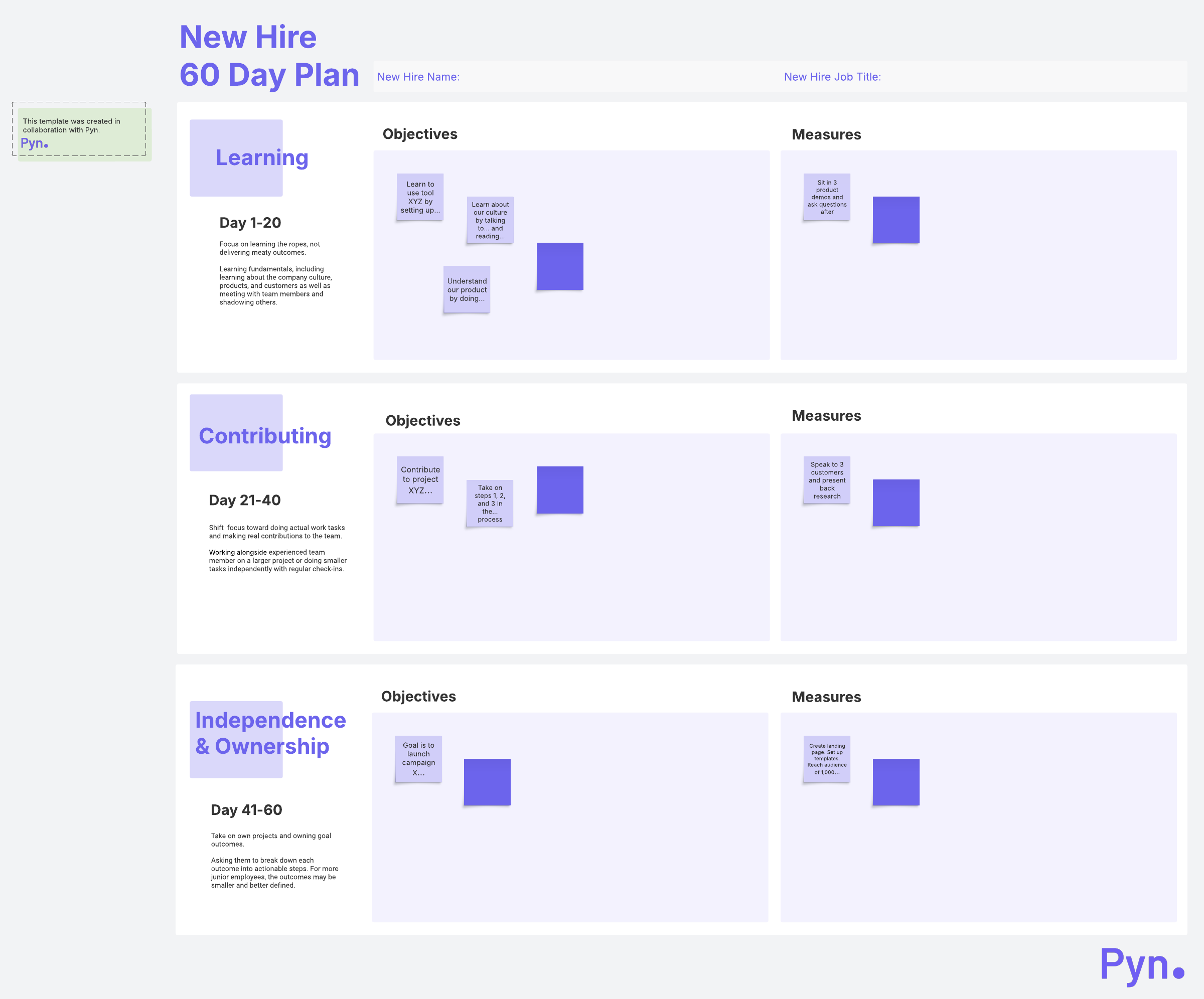
Guide your new hires from "learning it" to "owning it" with Pyn's 60 day onboarding plan.
What is the Pyn 60-day onboarding plan?
We’ve partnered with Pyn to create this template, which helps you plan out what your new hire should do within their first 60 days. It’s part of Pyn’s onboarding checklist, and you and your new hire will work together to complete it.
This onboarding plan helps new hires smoothly transfer from learning the basics to owning their projects and working independently. The first 20 days focus on learning, the second 20 days focus on contributing, and the final 20 days focus on independence and ownership. Refer back to this plan as you think of how to help your new team member get comfortable and integrated with the team.
Benefits of following the Pyn 60-day onboarding plan
The onboarding plan helps both the new hire and their manager. Your hire has structure and a plan to follow, which alleviates any new-job anxiety. Additionally, the plan eases them into their position, which helps them build their skills and knowledge to take on more and more tasks.
For you, the onboarding plan follows proven best practices, so you know you’re on the right track. It’s organized to be quick and easy to start, and you’ll be able to visually track the status of your new hire’s training at a glance.
How to use the Pyn 60-day onboarding plan template in Lucidspark
Work on one of the 20-day intervals at a time. Write objectives in sticky notes for the section you’re working on—you’ll see example sticky notes on the template to give you ideas. You can also provide context for each objective by adding in links and turning on Link Preview.
After you’ve added in your objectives, move to the “Measures” side of the template. Detail how to measure success on the objectives you entered in. If helpful, you can convert action items into Lucidspark Cards with clear deadlines and status tracking.
If you want to break down the tasks by date, try using the timeline feature. As your new hire progresses, check off tasks by changing the color of the sticky note or tagging it with a different status—and enjoy watching your new hire settle into their role on your team.