WebAssembly was first described to me as “a way to run C++ on the web,” which was technically vague enough to ignore, despite my love of both C++ and the web. I heard about it again later at the 2016 Chrome Dev Tools Summit, and I decided to check it out. After having played with WebAssembly a little bit, I can honestly say I love the technology and am excited to see it evolve.Before going any further, here are a few things that I think WebAssembly isn’t and won’t be in the foreseeable future:
A replacement for JavaScript
The one-stop easy shop for super-charging your existing web applications
A total replacement for native apps
With that out of the way, on to the interesting stuff!
WASM is really fast, right?
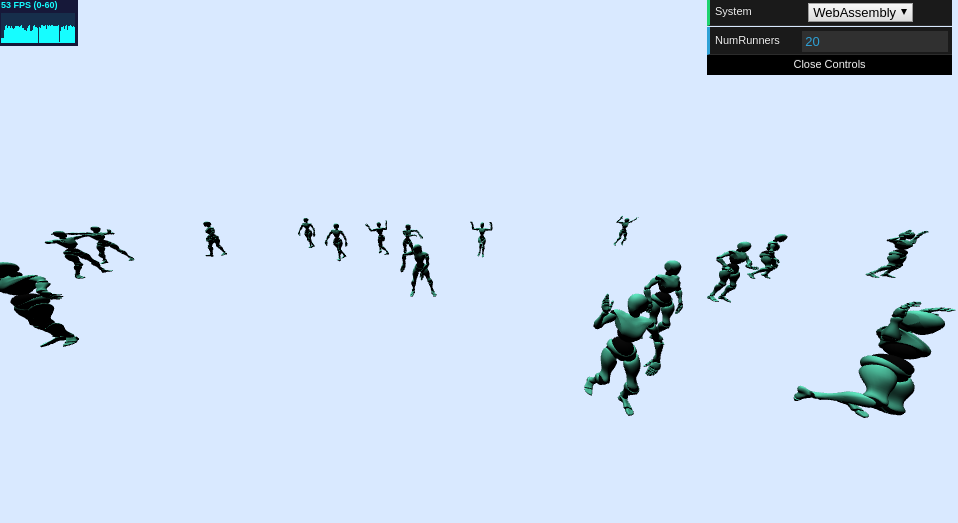
Yes! Oh dear sweet goodness, yes.There’s a pretty good video editor demo here showing off a handful of video algorithms. For the rest of the article, I’ll be talking about my own 3D character animation experiment (code with link to live demo here), which was written carefully to compare JavaScript and WASM without any major algorithmic differences. There are fundamental differences to how C-style arrays and structs work compared to JavaScript arrays and objects, but that’s somewhat unavoidable—I could have hacked in C-style things to JavaScript typed arrays, but I wanted to keep the code idiomatic where possible. See this document for general architecture.These are the results I observed after running 15 high-detail animated characters with 4 possible animations on desktop platforms and 8 animated characters on mobile platforms. These benchmarks are somewhat rough (especially the Android one), but they do make their point well:For reference, 60 frames per second (FPS) is the maximum allowable by most displays and translates to an average frame time of 16.6 MS. Running 60 FPS provides a crisp and smooth experience. Movies and TV generally run at 24 FPS, which requires an average frame time of around 42 MS. Anything less than 10 FPS is unacceptably choppy for anything animated, the bar for which is 100 MS per frame.
Developing with WASM
For the rest of the article, I’m going to talk about C++ exclusively for development, though WASM is not strictly C++. The tools for WASM are very new, with C++ and Rust being the only supported languages I’ve seen used so far.
Build Tools
Despite being very new, the tools are quite smooth. I used Emscripten, and after a little bit of a difficulty initially setting up the compiler (in these early days, you have to check out the ‘incoming’ branch), I was able to compile to WASM using a command very similar to standard GCC compile commands. For simpler tests, I was able to use the tools Emscripten uses under the hood as well: Clang, LLVM, and Binaryen.In these early days of WebAssembly, I did have to bring in the incoming Emscripten branch, like so:
This generates a WASM file that can be consumed by the browser, which leads me to...
JavaScript API and communication to/from C++
A WASM file is used to generate a WebAssembly module (think of it as the executable), which can then be instantiated as a WebAssembly instance (think of that as the process). This instance is sandboxed and accessible from your JavaScript code. Creating a WASM module is very simple, especially with ES6 Promises—fetch the binary code from the network, run it through a pretty easy command, and bam! Module. Easy as pie and just three lines of code.Instantiating the module is where you provide the WASM memory object and JavaScript-exported functions that your C++ code needs. As an interesting note, this may include a lot of inner functionality used in the C++ standard libraries. Math functions like sin and cos are often implemented using raw assembly segments, which cannot be used directly in WASM. Here is what I ended up using for my demo (comments added for context):naivewasmanimationmanager.ts
Once the module is instantiated, all functions exported from the C++ code are available in the “exports” object attached to the instance. Generally, these are all functions in your C++ code, so I recommend using extern “C” for the ones you’re interested in— preventing name mangling performed by the C++ compiler.
So what’s the catch?
Just like any tool, there are times when WASM is and isn’t appropriate to use. Here are some things you’ll need to know before deciding to use it in your own project:
WebAssembly can only communicate with numbers
WebAssembly supports integers and floats, coming in 32- and 64-bit varieties. That’s it. The JavaScript number can be coerced into any of those, which is nice. C++ structs boil down nicely using only numeric types (all data are bytes eventually), but JavaScript objects and arrays don’t translate so easily. You’ll have to put in a fair amount of logic to translate JavaScript objects to/from their C++ equivalents, as well as a scheme to lay it out manually in the heap yourself. More on that in a bit.
The big implication here is that translating objects from WASM to JS and vice versa will incur a cost in performance and code complexity. Try to keep the communication as narrow as possible, unless the communication only involves numbers. Write distinct modules in WebAssembly, not just individual classes or function implementations.
JavaScript is responsible for all memory management
WebAssembly uses a memory heap that must be provided from the JavaScript. From the JavaScript, this is essentially a wrapper around an ArrayBuffer. From C++ code, this looks just like the normal heap—dereference a pointer, and you get a variable containing the memory as it exists at that location in the heap. Fun fact: this means you could write valid code that dereferences NULL, with 0x00 being a valid address to the beginning of said JS ArrayBuffer. Please don’t do that. Every time you do, a fairy dies.
Having access to the WASM instance memory via JS ArrayBuffer is nice, because it lets you access the memory from both the JS and WASM sides of your application. Unfortunately, you don’t have access to system allocation commands like “malloc” and “free,” so you essentially have to write your own. Stanford students rejoice— that CS107 lab will come in handy. Using tools like Emscripten can also definitely help you ease this pain, as a lot of that is boilerplate that can be reused.
Debugging
Dear reader, by the time you read this, I hope the next paragraph is obsolete. I have good reason to believe it will be. But if you, like me, are stuck in the before-times, patiently awaiting the implementation of WASM source maps, the next paragraph contains bad tidings indeed.
Currently, there are no source maps, but that is something that is in the sights of the WebAssembly group. The text and binary formats for WebAssembly are interchangeable, so browsers can show you the text format for your code. However, that functionality is less helpful than it sounds because WAST (WebAssembly Text format) appears to be some unholy combination of assembly and LISP. If something goes wrong in your WASM code, it is extremely difficult to find. Protip: The C++ __LINE__ macro will be your best friend, as that gives you a helpful number to pass to the JavaScript in the case of a problem.Thankfully, I picked a project that has generally hilarious bugs, so the feeling of wanting to gnaw my arm off was sprinkled with humor at the ridiculous things the dancing bots did:My favorite bugs from the MANY that I ran into, most of which resulted from typos and accidentally overwriting memory JavaScript-side.I recommend setting up unit tests for your modules that can be run from a C++ environment. That way you have access to better console log debugging or proper IDE debugging tools. I stubbornly avoided doing so, but if I had done that from the start, I would have saved several hours of headache.
Remember that JavaScript can be really fast, too.
Thinking about JavaScript as always slow and WASM as always fast is a mistake. JavaScript can be written to be very fast. At the risk of turning this article into a shameless promotion, look at Lucidchart and Lucidpress. Both editors are implemented completely in TypeScript/JavaScript, and both are very smooth web applications. They really do make a great replacement for a native application, even though they don’t use any WebAssembly (yet).
If you’re looking for cheap optimizations, there’s plenty you can do. Profile your code and look to resolve the bottlenecks. Replace forEach calls with for loops, avoid reallocating memory where possible, move intermediate math work into typed arrays where they can be reused, and don’t put stress on the garbage collector. Make sure your code plays well with the optimizing compilers in modern JavaScript engines. Cache for days, where appropriate. WebAssembly is not something you should turn to for incremental improvements to an existing project but rather for introducing entire modules that have very strong performance.
So should you use WebAssembly?
I think any web programmer could benefit from knowing WebAssembly. At the end of the day, you might decide it’s not worth using in your own web application, but it is an extremely powerful tool that you should absolutely keep handy. The learning curve is pretty mild for someone comfortable with both JavaScript and C++. The community is young and small, but it is active and welcoming. The technology itself shows promise for future development, with plans for supporting garbage collection, threads, and source maps being among many proposed features.
Just remember that WebAssembly fits well into having a module be written in WASM, not just a class. Have well-defined boundaries between what runs WASM and what runs JS, with as little non-numeric communication between them as possible. Be ready to get your hands dirty with binary representations of your objects. As always with new technologies, be sure to have a JS fallback until support is widespread.
Happy hacking!
About Lucid
Lucid Software is the leader in visual collaboration and work acceleration, helping teams see and build the future by turning ideas into reality. Its products include the Lucid Visual Collaboration Suite (Lucidchart and Lucidspark) and airfocus. The Lucid Visual Collaboration Suite, combined with powerful accelerators for cloud and process transformation, empowers organizations to streamline work, foster alignment, and drive business transformation at scale. airfocus, an AI-powered product management and roadmapping platform, extends these capabilities by helping teams prioritize work, define product strategy, and align execution with business goals. The most used work acceleration platform by the Fortune 500, Lucid's solutions are trusted by more than 100 million users across enterprises worldwide, including Google, GE, and NBC Universal. Lucid partners with leaders such as Google, Atlassian, and Microsoft, and has received numerous awards for its products, growth, and workplace culture.

 These are the results I observed after running 15 high-detail animated characters with 4 possible animations on desktop platforms and 8 animated characters on mobile platforms. These benchmarks are somewhat rough (especially the Android one), but they do make their point well:
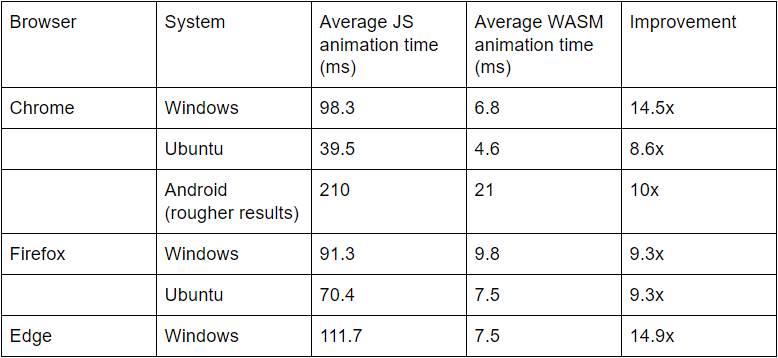 For reference, 60 frames per second (FPS) is the maximum allowable by most displays and translates to an average frame time of 16.6 MS. Running 60 FPS provides a crisp and smooth experience. Movies and TV generally run at 24 FPS, which requires an average frame time of around 42 MS. Anything less than 10 FPS is unacceptably choppy for anything animated, the bar for which is 100 MS per frame.