Although virtual meetings have a lot to offer hybrid and remote teams, great virtual meetings don’t happen by accident. By preparing in advance, you can prevent common virtual meeting challenges.
To make your virtual meetings more intentional from the start, implement these meeting best practices that can improve participation and engagement.
Technical meeting problems and solutions
Although technology makes virtual meetings possible, it's almost a given that you'll run into technical issues during them. These issues can show up for both facilitators and participants—potentially impacting your success in collaborating with your team.
Virtual meeting challenges may run the gamut from internet issues to software bugs. Common technical problems with virtual meetings include:
- Bad connection
- Feedback or echo
- Poor sound quality
- Video slows or stops
- Dropped meeting or call
- Software updates
- System incompatibility
- Wrong settings or permissions
If you don't have a plan for how to manage those technical issues, the productivity of your virtual meetings may suffer.
Prevention and planning are your best tools for managing technical challenges of virtual meetings. Not all of your participants may have the same level of comfort with technology and resolving their own technical issues, so you as a facilitator may need to help troubleshoot technology. If necessary, ask everyone to install the meeting software beforehand and check their microphones, sound, and connectivity in advance of the meeting.
Solutions
Here are possible solutions to common virtual meeting challenges.
Microphone not working
If your microphone isn’t working properly, it’s possible that the wrong microphone is selected in your settings or that your permissions aren’t granting your meeting software access to your microphone. Your computer/device may have more than one microphone, so be sure to check that you’re using the correct one. If one microphone isn’t working properly, you can switch to a different microphone or purchase a plug-and-play microphone for your device. Test your microphone using a free online testing tool or built-in testing via your meeting software platform.
Feedback or an echo
Speaker noise could be caused by problems with a participant’s microphone and speaker setup, so if you have a large number of participants attending the meeting, be sure to ask them all to mute their microphones when they’re not speaking. You can look for the source of the echo by testing each microphone one at a time, if needed.
Speaker not working
Speaker issues are often a software problem, meaning you may need to check software settings or permissions. As with microphones, speakers can be tested online or within your meeting software. Aging speakers sometimes develop sound problems, too, so you may want to consider purchasing a high-quality speaker or headset you can plug into your device.
Background noise
During the call, ask everyone to mute their microphones while they aren’t speaking. Facilitators and participants should find somewhere quiet to join the meeting and silence background noise, if possible. If that doesn’t eliminate the background noise, you may be experiencing a software issue. If all else fails, sometimes ending the meeting and starting over can help.
Weak connection
Ultimately, even the best internet connection has limitations, but a weak connection can make it impossible to facilitate or participate in a virtual meeting. Sharing a connection with high-bandwidth activities such as video streaming, information processing or uploading can make it more difficult to successfully run a virtual meeting. Try to save high-bandwidth activity for when you aren’t in a meeting. Before the meeting begins, check your connection.
No internet
When your internet connection fails, your meeting software will usually drop your call unexpectedly, and you won’t be able to reconnect. If your internet connection is unreliable, have a secondary connection available. Sometimes a smartphone hotspot will suffice in a pinch. If your connection drops suddenly, try reconnecting.
Participation challenges and solutions
Like technical challenges, participation issues can disrupt virtual meetings or reduce their likelihood of success. Quality participation means everyone both contributes and gets value from the meeting.
What you do to encourage participation as a facilitator, opens in a new tab can have a direct impact on your results. Do what you can to help your participants get the most out of the virtual meeting.
Participation issues can range from the impact of time zone differences to how easy it is to interrupt other meeting attendees. Other common meeting challenges include:
- Multitasking during the call
- Distractions outside of the meeting
- Boredom or a lack of engagement with the topic
- Focus on other projects or on personal issues
- Participants feel uncomfortable or unacknowledged
- Participants don’t know each other well
- Meeting is scheduled at an inconvenient time for a particular time zone
- Forgetting which time zone the meeting is in
One or more of these challenges could interfere with a participant’s ability to attend the meeting and participate successfully. For this reason, it’s important to work with your participants so that everyone has what they need.
Solutions
To improve participation quality, keep your meetings well-organized and prepared. Here are a few tips for how to improve virtual meetings:
Use an agenda
Let everyone know what to expect during the meeting and when by using an agenda, opens in a new tab. With that information, they can plan their schedule better and know what to pay attention to during the call.

Find the best time
Split the difference between time zones to build engagement and boost attendance. If possible, avoid scheduling meetings that are late in the night or early in the morning for your attendees. You could also pre-record a presentation and schedule a short follow-up meeting for questions.
Build rapport
Whenever possible, create an environment in your virtual meeting room where attendees feel comfortable asking questions or making comments. You could ask someone ahead of time to ask you a question or two during the meeting to help other attendees feel comfortable.
Make it visual
Having visuals to look at provides more reinforcement for the topics discussed during your meeting, helps visual learners to participate, and helps to alleviate boredom.
Break up long presentations
If you’re presenting difficult or lengthy information to a group, consider breaking up the presentation into smaller pieces with different activities or topics in between. For instance, after a 10-minute overview of a new topic, you could open up a discussion around a short case study or example before moving on. Remember that long meetings are unlikely to succeed—many people begin to lose focus when meetings are longer than an hour. You could schedule breaks or plan a long meeting in sessions over a few days.
Ask questions
Engage participants during a long presentation by asking your audience a question or two for discussion.
Brainstorm in advance
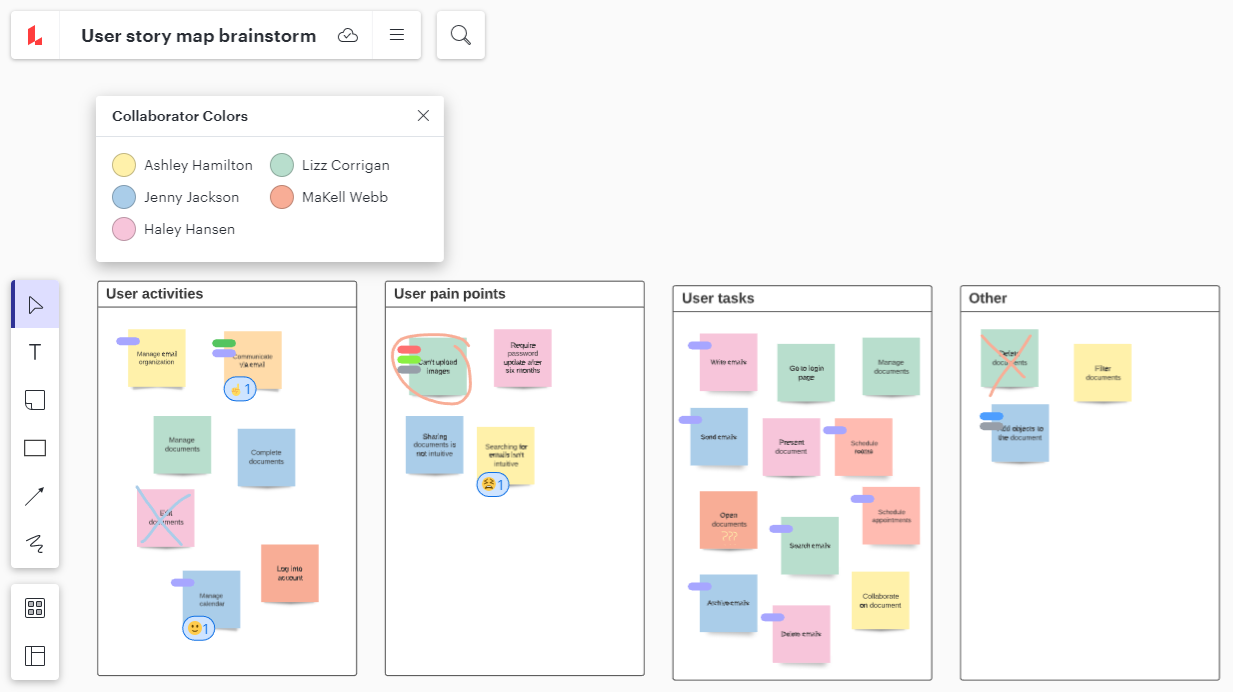
Ahead of time, you could invite participants to brainstorm before the meeting via a virtual whiteboard such as Lucidspark. Your participants could ask questions, review ideas, and even make suggestions before your meeting. This process can make your meeting more productive, opens in a new tab and help your participants to get involved.
Improving meeting engagement and facilitation
Often, how facilitators run their virtual meetings has a direct impact on the quality and value attendees receive. Facilitating better meetings has a lot to do with making meetings more meaningful and helpful rather than just mandatory online gatherings.
Ineffective facilitation can cause many meeting challenges, such as:
- Meeting moves too fast or too slow
- Only some attendees sharing ideas while others aren’t heard
- Uncertain goals
- Incomplete guest list or too many attendees
Solutions
To facilitate a better meeting for your attendees, consider:
Involving the meeting sponsor
Ask whoever gains the most from your meeting’s outcome to share their own expectations and objectives with you. Find out what outcome your meeting needs to meet in order for it to be considered productive. You can use this information to guide your planning, invitations, and scheduling.

Setting expectations upfront
At the beginning of the meeting, let everyone know how long you expect the meeting to last. Share your meeting agenda and let everyone know when you’ll be opening the meeting to questions and discussion.
Asking everyone to turn on their cameras
Having your cameras on improves connection. Whenever possible, specify in the meeting invite that your meeting will have cameras on, so your attendees know what to expect. When the call starts, ask everyone to turn on their camera where possible. If this isn’t practical for the entire call, then you may want to have a quick introduction at the beginning of the call before switching to a screen share.

Empower your team to solve complex problems with clear and creative solutions. Sign up for our free, Creative Facilitation course.
Register hereRun effective virtual meetings
By speaking to the meeting sponsor, creating a plan for your meeting, mitigating technical issues, encouraging participation, and having clear expectations that you share with attendees, you can create better meetings and help your team communicate more effectively. Over time, you can build your own internal best practices around meetings and use those guidelines to strengthen your team’s culture.

Explore dozens of templates to boost efficiency and collaboration in your virtual meetings.
See templates